
• Skip to primary navigation
  • Skip to main content
  • Skip to primary sidebar
  • Skip to footer

KB6NU's Ham Radio Blog

KB6NU's Ham Radio Blog
  • HOME
  • Study Guides
  • Teach a One-Day Tech Class
  • W8SRC Repeater Guide
  • Advertise
  • Hire Me

Odd problem with my Tech study guide PDF

June 29, 2020 By Dan KB6NU 5 Comments

So, I just got this email:

Hi Dan,

I was searching for a study guide for a friend of mine who wants to get his Tech class license. I came across the PDF version of your study guide, downloaded it and started going through it.

I don’t know if it is just me (as I am blind and use a screen reader), but I can not believe how many misspellings there are in this document. For example, the word “find” is always missing the letter “i”. Was this done on purpose? It would make me hesitant to recommend the purchase of the physical book.

Just curious.

Thanks,
John

No one has ever mentioned this to me before, so, I downloaded a fresh copy from my website. Just looking at it, all the words seem correct, but searching for words gives me different results. When I searched for “find,” there were three results, all spelled correctly. When I searched for “fnd,” however, there were 14 results, and when I looked for them in the text, the complete word “find” appears. See the screen shot below.
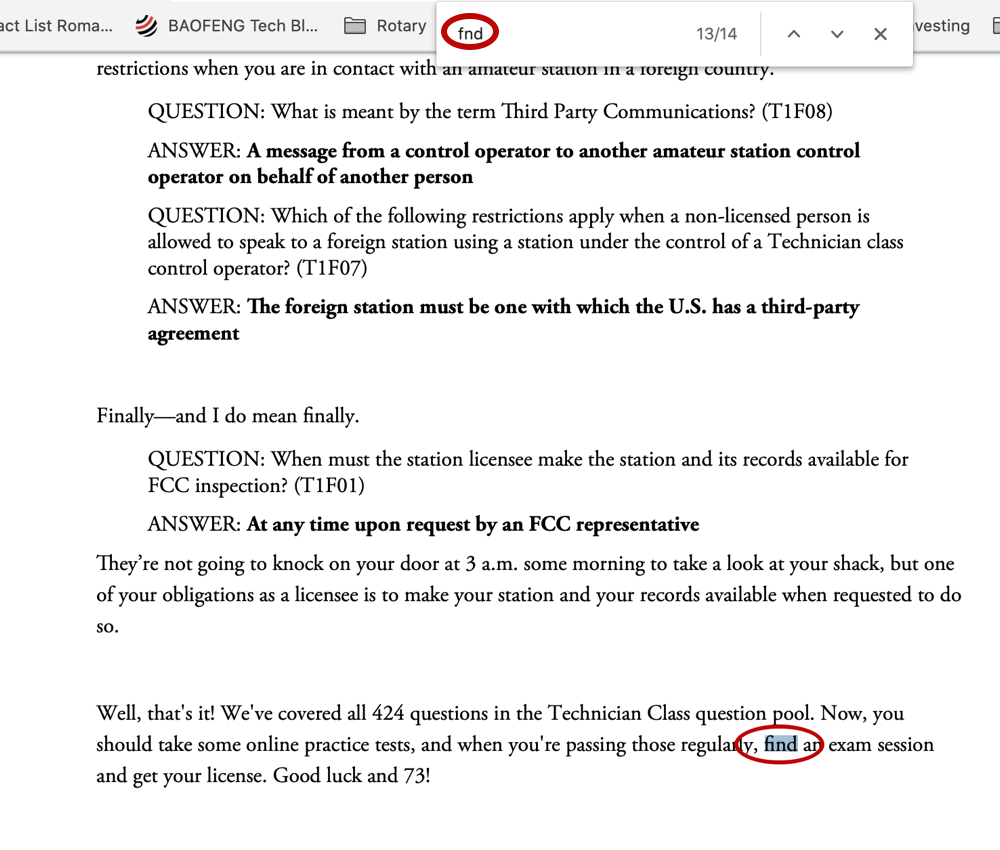
Click to see a bigger version of this screen shot.

This happens in both the browser’s PDF viewer and the Mac Preview app, so I’m guessing that the problem is with the PDF file, not the programs

I’m not sure what to make of this, except perhaps that when I created the PDF (I use Libre Office on a Mac), some words got mangled in the export process, such that the fellow’s screen reader and the PDF viewer search functions aren’t seeing some characters even though they are there in the text. I don’t know what screen reader he’s using, but I’ve sent a reply asking for that information. I’ve also asked what other words he’s seeing as misspelled.

Have any of you ever seen something like this? Can you think of anything that I might do to fix my PDF files?

Related posts:

  1. 2018 No Nonsense Technician Class License Study Guide – Beta Release
  2. An Audio Version of the Study Guide?
  3. Version 1.1 of the Tech study guide now available
  4. 2018 Tech study guide – Electrical principles

Filed Under: Books and Magazines Tagged With: 2018 Tech Study Guide, PDF

Reader Interactions

Comments

  1. Chris KD8VHL says

    June 29, 2020 at 3:00 pm

    I can’t speak to what to do to fix this, but a few notes:

    – In a PDF file, the image that’s displayed and the text content accessible to eg. screen readers are different. You can have a page that looks like text but that’s totally unreadable for screen readers and from which users can’t select and copy text.

    – It looks like the words in question are those that contain ligatures ( https://en.wikipedia.org/wiki/Orthographic_ligature )

    – Quick Googling for “libreoffice ligatures” reveals that LibreOffice may implement ligatures by auto-replacing these character combinations with single characters, which presumably the PDF export process then mangles: https://ask.libreoffice.org/en/question/216867/how-can-i-globally-disable-ligatures/

    Hope that helps point you in a useful direction!

    Reply
    • Dan KB6NU says

      June 29, 2020 at 3:45 pm

      Thanks. I think that’s it!

      Reply
  2. Karl Heinz - K5KHK says

    June 29, 2020 at 10:24 pm

    I was just about to jump in and then saw Chris’
    reply. He is right, this is faulty ligature handling when creating the PDF file. If you want help fixing this, send me an email – de K5KHK

    Reply
    • Dan KB6NU says

      June 30, 2020 at 10:23 am

      After doing some googling, I found a work-around. Instead of having Open Office export the PDF, you have to print the file, but instead of sending the file to the printer, save it as a PDF. (This is something that you can do on a Mac. I’m not sure if you can also do this on Windows.) When the PDF is created this way, no ligatures are created.

      I like this approach better than messing around with auto-correct, and it keeps the ligatures for print version. I still think that the PDF viewers and screen readers should be smart enough to handle ligatures properly, though.

      Reply
  3. DAVID J SAWICKI - WA3DS says

    July 1, 2020 at 11:52 pm

    Look for Microsoft Print to PDF under Print Settings.

    Reply

Leave a Reply Cancel reply

Your email address will not be published. Required fields are marked *

This site uses Akismet to reduce spam. Learn how your comment data is processed.

Primary Sidebar

No Nonsense Technician Class License Study Guide (for tests given between July 2026 and June 2030)

New No Nonsense Technican Class Study Guide now available!

The 2026 version of my Tech Class study guide is now available, and as always, the PDF version is FREE!. The ePub version costs $11.97, and a Kindle version and paperback version will be available on Amazon shortly.

Click here to get all of my "No Nonsense" study guides.

Also available: The CW Geek's Guide to Having Fun with Morse Code

W5SWL.Com
Retevis Ailunce H1 DMR Radio
DXpander: Cobweb antennas, Laser Cutting

You’ve got mail!

Enter your email address below and get an email every time I publish a new post.

Email


I frequently teach classes to help newcomers get their licenses. The next class will take place on Saturday, October 10, 2026 on the University of Michigan campus. Click here for more information.

If you can't make the class, subscribe to the mailing list to be notified of when the next class will be held.

You can always download my free study guide, and if you have any questions about the classes, or amateur radio in general, please feel free to email me directly.

Support KB6NU.Com

Donate $7.30 and get two of these cool stickers. Measuring 4.25-in. W by 2.75-in. H, it's perfect for your car, your shack, or wherever!

Contact me

If you have a question or comment about one of my blog posts, or a question about any of the material in my study guides, or just a question about ham radio in general, you can email me at [email protected].

Blogs You Should Also Read

  • AE5X: A CW-centric blog from Kingswood, Texas
  • K0LWC Blog
  • LA3ZA Ham Radio Blog
  • Little Radios, Big Fun – WB3GCK
  • Mr. Vacuum Tube's Blog
  • Radio Artisan – K3NG
  • The K0NR Weblog
  • VE3WDM's QRP Ham Radio Blog
  • W2LJ’s Blog

Ham Radio Websites

  • Dashtoons – The Hammin' Comedy by Jeff K1NSS

Podcasts

  • ICQ Podcast
  • Linux in the Ham Schack
  • No Nonsense Amateur Radio Podcast
  • Resonant Frequency Amateur Radio Podcast

Recent Comments

  • Dan KB6NU on 2015 General Class study guide: Section G2E – Digital operating: procedures, procedural signals, and common abbreviations
  • Jimi on 2015 General Class study guide: Section G2E – Digital operating: procedures, procedural signals, and common abbreviations
  • Ali on Some Good Advice on Learning Morse Code
  • mike on Instant Character Recognition is the key to CW speed
  • Matt W1CDN on A completely different picture of Wayne Green, W2NSD (SK)

Meta

  • Log in
  • Entries feed
  • Comments feed
  • WordPress.org

Footer

Copyright © 2026 Daniel M. Romanchik, KB6NU · Log in