
Just before Thanksgiving, I received an email from Cara Chen at Retevis. She wrote,
I am responsible for the radio review cooperation. We have a SDR radio HS2 for review cooperation. Are you willing to test and write a blog about it?
When I asked her what that meant, she said that she would send me an Ailunce HS2 SDR Radio, if I would review it here on my blog. When I told her that I would be brutally honest in my review, she seemed OK with that and sent me the radio.
What follows is an honest review. It’s not a QST-style review. I don’t have the test equipment that they do, nor did I have the time to put the radio through all its paces. Even so, I did operate the radio on HF and VHF, phone and CW, enough to make the review worth reading, I think.
If you don’t want to read the rest of this review, I can sum it up as follows: The Ailunce HS2 is a fun, little radio, with lots of potential. It’s not perfect, though. The buttons are too small, the display is too small, and the manual needs work. More about all those below.
What’s in the box?
As you can see below, the radio came with a handheld microphone, a DC power cord, and a USB cable.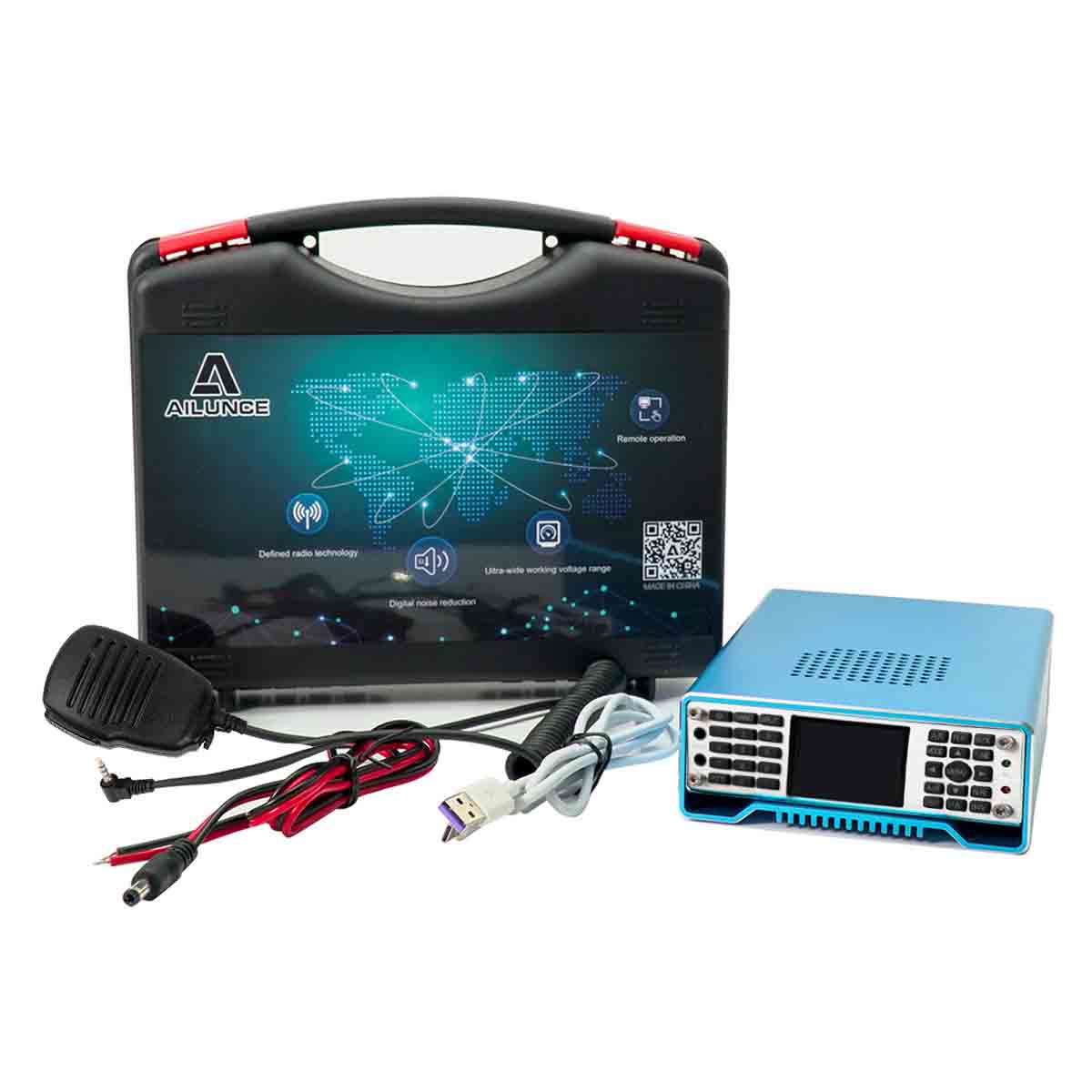
First impressions:
- It’s really small. It’s 45 mm H x 120 mm W x 190 mm D (1.77 in H x 4.72 in W x 7.5 in D)
- The carrying case is kind of nifty. If you’re going to operate portable, it’s nice to have.
- The extruded metal case include a nice heat sink.
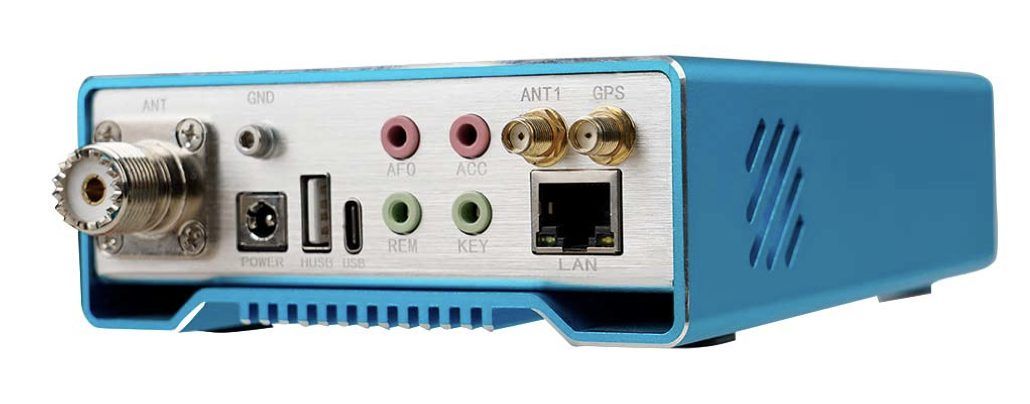
- There are a lot of connectors on the rear panel, including the power connector, an SO-239 for HF and VHF antennas, an SMA for a GPS antenna, two USB connectors, an Ethernet connector, and four 3 mm phone jacks.
Getting on the air
Getting the HS2 on the air was relatively easy. After unboxing the radio, I crimped a couple PowerPole connectors on the DC power cord, plugged it into my DC power strip, connected an antenna, and I was receiving.
The first thing that I thought I’d try is to make a contact using one of the local repeaters, so I started paging through the manual to find out how to do this. My first time through, I completely missed the instruction, though, because the section containing the instructions for repeater operation is labelled, “Relay operation.”
After some fiddling, I finally managed to get the appropriate frequencies programmed into the radio. Doing this is a bit more difficult than most VHF/UHF radios as you have to program these frequencies as if you were operating split on HF. That is to say you have to program them separately. And, it’s a good thing that our repeater doesn’t use CTCSS tones because it probably would have taken me an extra 15 minutes to figure out how to do that.
Once programmed, though, everything seemed to operate quite nicely. I even got a nice report on the audio.
The received audio is quite nice, too. The 2.5-in. speaker is on top and produces loud, clear audio. I hate to say it, but it beats the speaker in my KX-3 hands down.
Getting on HF
The next day, I thought I’d put the radio through its paces on HF, in particular 40-meter CW. That’s where I made my first mistake. I didn’t realize that I had to take it out of split mode, so my first couple of calls were not on the frequency that I’d been receiving on. When I got it set up properly, I had much better success. <grin>
The radio has two different power output ranges. The first has a maximum output of 5 W. The second a maximum of 30 W. There’s a separate setting for % output power. So, for example, if you want to set the output power to 20 W, you’d first set the output range to 30 W, then set the % output power to 66%. I’m not sure why you need two ranges, but that’s the way it works.
The keyer and other CW features seem to work quite well. One of my paddles has a 3.5 mm plug on it, and that plugged into the KEY jack on the back of the radio and worked right off. With the CW SET menu, you can also set up the KEY SPEED, if you’re using a paddle, the sidetone frequency and volume, and the TX-RX switching time. Note that the HS2 does not offer full break-in. Since I’m used to operating in full break-in mode, I found that to be a little annoying.
I didn’t do any fancy measurements of the transmitter’s output waveform, but no one I contacted had anything bad to say about my transmissions.
Setting up the bandscope and waterfall display takes a bit of fiddling. You first set the display mode (bandscope only, waterfall only, or both). Then you set the bandwidth to be displayed, the reference level and the waterfall speed. The display is really small (about 28 mm x 38 mm), and there are no grids displayed, but even so, once you get used to it, it’s handy.

Setting up the filter width is kind of screwy. You don’t set the filter width, as you might with other SDRs. Instead, you select from a menu of pre-programmed settings. I got a little frustrated trying to find the right setting for CW, so I selected 0 – 1.4 kHz. It’s a little wide, but it works.
No IQ Output?
One feature that I was kind of disappointed that I couldn’t get to work was connecting it to HDSDR running on my PC. I reckoned that connecting it to HDSDR would make the bandscope/waterfall display more usable and that it might be easier to set the controls using the PC, just like I do with my Flex 6400.
Unfortunately, the firmware in the HS2 doesn’t seem to support this option. The manual says to set the USB output mode to IQ, but when I enter that menu on the radio, that selection isn’t available.
This is one area where the manual really needs to be improved. One of the instructions says to, “Open the HDSDR software and set the parameters in sequence according to the figure.” The figure, unfortunately is so tiny that it’s impossible to decipher.
I think that this could be a really killer feature, and I’m hoping that perhaps there is a firmware update coming that will enable me to use the radio with HDSDR in the future.
There are some instructions in the manual on how to get the radio to work with N1MM contest logging software and the WSJT software suite, but I haven’t gotten around to trying that yet. I would expect this to work well, though. The USB output menu does have the right selection (DIGI) for this operation. Apparently, the HS2 emulates the FT-817 when being controlled by external software.
More HF operation
I set the radio aside for a couple of weeks, but yesterday, I decided to hook it up again and give it another go. The Straight Key Night operating event was still in full swing, so I hooked up a straight key to it and made a couple more CW contacts.
After that, I plugged in the microphone and made several sideband contacts with Parks on the Air (POTA) stations. Without making any effort to set the mic gain or It seemed to work just fine on sideband, even at 30 W. The default receive filter setting for sideband operation is 2.7 kHz.
As I was setting the radio up for SSB operation, I somehow managed to get it into the mode for programming memory channels. This was really annoying as I couldn’t figure out how to get out of that mode, and the manual was no help. There were no instructions on how to program memories at all. I resorted to an internet search and, fortunately, found the information I was looking for in a blog post on the Ailunce website.
One thing I noticed is that as I used it, the controls became less annoying. I guess that’s only natural. I still wish the buttons were bigger, though.
Other cool features
The HS2 has many other cool features, some I’ve tried, some I haven’t. These include:
- FM broadcast reception. I did try this, and it worked great.
- Bluetooth. One of the options that you can purchase is a Bluetooth microphone. There is also an iPhone and Android app that allows you to control the HS2 remotely.
- LORA. It looks like you can exchange messages with other HS2s using LORA using the QCHAT application, but the manual is very sketchy on how to do this. What might really be cool is the capability of sending and receiving other types of LORA transmissions.
- GPS. There is an optional GPS receiver that you can use to display the time, speed, altitude, and other information. There’s no indication that the GPS receiver can be used to discipline the output frequency of the radio, though. I actually purchased a GPS antenna from Amazon, but I didn’t buy one with the right connector, so I couldn’t test this feature.
- There’s an Ethernet connector on the back of the radio (see below). I couldn’t find any documentation on how to use it, or if it is even supported at this point. It would be neat if I could connect the radio to my PC just as I do my Flex 6400.
Conclusion
The HS2 is still very much a work in progress. Ailunce admits as much. On their website, they say, “We will continue to update the firmware to improve the functions, If you strive for perfection, please think twice before placing an order.”
It’s certainly got a lot of potential, especially if they can get the connectivity features working. Being able to control the radio from a PC would mean that operators wouldn’t have to hassle with the small buttons on the front panel and would be able to see the bandscope and waterfall display on a bigger screen.
Finally, if you want to order the Ailunce HS2, check out all of the pages on which it appears. They all seem to have a different price. On https://www.retevis.com/hs2-full-frequency-full-mode-ultra-portable-sdr-radio-us, it says that the list price is $1,438, and the sales price is $906.99. On https://www.retevis.com/amateur, it says that the list price is $1,118.00, and the sale price is $707.99. On AliExpress, the price is $699.99. On https://www.ailunce.com/hs2-hf-vhf-uhf-sdr-transceiver#A9154c, the sales price is $599.99.
I just tried to look at http://www.ailunce.com, but a message came up on my browser saying this:
Malwarebytes LogoBrowser Guard
Website blocked due to trojan
Website blocked: http://www.ailunce.com
Malwarebytes Browser Guard blocked this website because it may contain malware activity.
When these first surfaced several yrs ago there was talk of a tuning knob option, but nothing since 73 John
I have one, you get a giant tuning knob on your cellphone screen, so you can adjust VFO in small amounts.
Hmmmmm. I haven’t tried that app. I probably should to make it a fair review.