• Skip to primary navigation
  • Skip to main content
  • Skip to primary sidebar
  • Skip to footer

KB6NU's Ham Radio Blog

KB6NU's Ham Radio Blog
  • HOME
  • Study Guides
  • Teach a One-Day Tech Class
  • W8SRC Repeater Guide
  • Advertise
  • Hire Me

CW

Morse Code Meets Cell Phones

June 29, 2005 By Dan KB6NU Leave a Comment

On weblogs.oreilly.com, Brian McConnell proposes that cell phone manufacturers include Morse Code capability into the next generation of cell phones. McConnell notes a lot of advantages to using Morse Code instead of the small keyboards that most cell phones now have:

  • The telephone would have a fairly large pressure sensitive panel on its back side, big enough that you would not have to look at the phone to locate it.
  • When carrying the phone at your side, you could send messages with one hand by tapping on the back of the phone.
  • You can program the phone to perform different functions, depending on what character you tap in.

Unfortunately, I think he’s being a bit too optimistic about how easy it will be for cell phones to receive the messages sent. He says,

Receiving messages is less of an issue, since they’ll arrive as text messages. The sending telephone will convert the tapped dots and dashes into alphanumeric messages to be sent via SMS or IP.

I have doubts, however, that the manufacturers will be able to build in a decoder able to accurately read the poor CW that most users will send. As anyone who has played with the MFJ code readers or other similar devices will tell you, the code being sent has to be pretty good for the reader to have any chance of deciphering it. I doubt that the majority of users will develop the fists required to really make good use of this feature.

Oh well, it was an interesting idea before reality set in.
Filed Under: CW, Everything Else

Tips for Passing the CW Test

June 27, 2005 By Dan KB6NU Leave a Comment

Don’t wait for the CW test to be eliminated to upgrade. It’s really not that tough, and you can do it. On the SolidCpyCW mailing list, Greg O’Brien, NE1OB, a Volunteer Examiner, offered the following tips:

  • Things to remember:
    • The format of the code sent is an exchange in a typical QSO.
    • After VVV VVV, the test will begin with callsign de callsign.
    • It will end with callsign de callsign plus appropriate prosigns. So, you will have two chances to get the callsigns correctly.
    • Usually one callsign will contain a “/”, for instance k1pid/7 or ne1ob/m.
    • Each exam will contain all 40 characters(A-Z, 0-9 ‘/’, ‘?’, ‘.’, ‘,’) and prosigns (‘AR’, ‘SK’, and sometimes ‘BT’).
    • You need 25 characters in a row BUT numbers and punctuation and prosigns count as two characters.
    • Spaces do not count.
  • Other elements commonly included in the QSO exchange:
    • rig (so know the common manufacturers, including Icom, Yaesu, and Kenwood),
    • power (this is where the digits are used so it probably wont be 100),
    • type of antenna (dipole, loop, vee, yagi etc.),
    • antenna height (digits here),
    • QTH (Don’t count on the state matching the town, and the comma will probably be between the city and state),
    • caller and called ham’s names.
  • The above elements plus the callsigns will be the basis of the 10 questions. When you answer the questions, enter the answer exactly like it was sent. If “California” was sent, don’t write “CA” or “Calif” as the answer.
  • Things to study before the exam:
    • Practice numbers and punctuation and prosigns to death. They count double, you cannot usually figure them out from context, and you probably spent more time on the letters.
    • Practice callsigns – callsigns are hard. They contain numbers and ‘/’. They come at the beginning of the transmission and if you have trouble with them, it may wreck you confidence for a while.
    • Learn the common manufacturers and models.
    • Review the common antenna types.
  • Key advice for the exam:
    • Relax. Take a deep breath. Shake it out. Just imagine you are in your normal practice environment. (I know that it’s easier to say then do .)
    • There will be a one minute warm-up before the 5 minute transmission. Make sure the volume is comfortable for you. Copy the warm-up to get loose.
    • When you miss a character, just leave a space or an underline. Don’t try to replay it in your mind. You can fill it in later.
    • At the end of the code sending, you will have time to review your copy and fill in those blanks you left. Use all your puzzle solving skills.
    • Do your best on the 10 questions even if you think there is no way.
  • Remember, the VEs want you to pass.

Greg also notes, “for a detailed look at a sample exam and more tips see the AC6V website.”

Filed Under: CW

Morse Code Still Beats Instant Messaging

May 9, 2005 By Dan KB6NU Leave a Comment

In Sydney, Australia, the Powerhouse Museum staged a contest that pitted the oldest type of electronic text messages with the newest–Morse Code vs. instant messaging. Winning the race was 93-year-old telegraph operator Gordon Hill, who learned Morse Code in 1927 and worked for the Australian Post Office. He easily beat Brittany Devlin, his 13-year-old rival, , who used a mobile phone and text messaging shorthand. Mr Hill, whose messages were transcribed by another telegraph veteran, Jack Gibson, 82, then repeated the feat against three other children and teenagers with mobile phones.

Read the complete report at
http://www.160characters.org/news.php?action=view&nid=1541.

Filed Under: CW

Taking a Turn as KN0WCW

May 4, 2005 By Dan KB6NU Leave a Comment

Well, for the past 24 hours, I have been masquerading as KN0WCW.

KN0WCW is the callsign, appropriately enough, of the Fists CW Club. I operated for approximately two and a half hours, making 12 contacts in 10 states. All of my contacts were on 40m, as that was the most appropriate band at the times I was on.

It was a lot of fun. Two of the 12 stations I’d worked before, one of them many times. He was quite surprised to hear that it was me using the Fists call. Conversely, I was quite surprised to find out that he was a Fists member. In the dozen or so previous QSOs, he’d never mentioned it, and I had never asked.

I would encourage all Fists members to take a turn as KN0WCW. Not only was it fun, but it does promote Fists and the use of CW.

Filed Under: CW

Online Romance……….via Morse Code

May 1, 2005 By Dan KB6NU 1 Comment

In the late 1800s, if you wanted to chat online, you had to do it with Morse Code. In the novel, Wired Love, a telegraph operator named Ella Cheever Thayer describes not only chatting online via the telegraph, but also a romance that develops between a female operator and a male operator down the line. In this radio essay, writer Paul Collins describes how it was to work as a telegrapher at that time. It also includes a few excerpts from the novel. It’s very interesting.

As a followup, Dean Olscher interviews Mel Schneider K2KEY. Mel, who is vice president of the Kings County Radio Club, talks about ham radio and how hams communicate with Morse Code. The report describes the differences between American Morse Code, which was used by the landline telegraphers here in the U.S. and the International Morse Code, which was used by telegraphers elsewhere around the world and by the maritime operators.

Filed Under: CW

The Vail Code??

April 27, 2005 By Dan KB6NU 1 Comment

Samuel F.B. Morse, for whom the Morse Code is named was born 214 years ago today. But we should perhaps be calling it the Vail Code instead, as Craig W3CRR recently pointed out on the ARRL’s PR Mailing List:

Curiously, Samuel F.B. Morse didn’t actually invent the “Morse” code. Alfred Vail did. Morse’s original idea was to assign discrete number codes to hundreds of commonly used words. Vail, after witnessing a telegraphy demonstration by Morse, befriended Samuel and worked out the far more practical code system whereby each letter of the alphabet is represented by a series of long and short closings of a switch (which became the famous Vail Correspondent telegraph key). The complexity of each letter’s code was determined in part by its frequency of use in written communications — which is why “e”, the most commonly used letter, is represented by a single “dit”.

So, actually, we should call our code the “Vail Code”.Vail, however, was generous and modest enough to allow Morse — who publicized his technology (greatly enhanced by Vail) and Vail’s Code — to take the credit. Vail did share in the considerable profits of their joint venture, though.

My source for this information is a wonderful book entitled “Signor Marconi’s Magic Box” by British journalist Gavin Weightman. It was published by Da Capo Press in 2003. I recommend this book to anyone interested in the history of wireless communications.

Filed Under: CW

QRP Newsletter Now Available in CW Format

April 26, 2005 By Dan KB6NU Leave a Comment

Recently, Ray Goff G4FON added MP3 generation to his brilliant Koch CW Trainer program. Now, Nigel Gunn G8IFF/KC8NHF is using that feature to make available the newsletter of the Flying Pigs QRP Club International–Bacon Bits Quarterly (BBQ)–in CW format. The files are a bit on the large side–part 1 of the April editorial was a bit over 20 Mbytes, but the code is beautiful. I’ve suggested to Nigel that he may want to zip the files as that makes them quite a bit smaller.

Filed Under: CW

The Rhythm of CW

April 7, 2005 By Dan KB6NU 1 Comment

Try these to get a feel for how rhytmic CW can be:

  • BENS BEST BENT WIRE
  • BEST BEEF ESSENCE
  • BEST BENT WIRE /5

I got all of these from the wonderful Elecraft mailing list. Just click on the list items to download a zipped mp3 file. I’m sorry about the zip, but it was the only way to make the file small enough to be easily downloadable. Zipped, these files are about 60 kbytes; unzipped, they’re over 2.5 Mbytes.

Filed Under: CW

This Weekend on the Radio at KB6NU: My Best Score Yet!

February 14, 2005 By Dan KB6NU Leave a Comment

The main ham radio activity this weeked at KB6NU was the FISTS Winter Sprint. It was really a blast. I did way better than the Fall Sprint, scoring 11,670 points on 79 QSOs and 30 multipliers. I followed pretty much the same strategy I did in the Fall Sprint. I operated just enough on 20m and 15m to add to the multiplier total and then banged away on 40m to roll up the QSOs. I didn’t work any DX this time, but I did increase my multipllier total from 21 to 30.

I even got to camp out on 7.058–the FISTS calling frequency–for about 30 or 40 minutes towards the end of the Sprint. I had a nice clear frequency for a while, but then N3BBO set up shop a couple 100 Hz away. Fortunately, I could filter him out pretty well, and it didn’t seem to stop other stations from hearing me and calling me.

My last QSO of the contest was with K4KSR, who was running QRP. When N3BBO transmitted, he covered him up completely. K4KSR stuck with me though, through several repeats, to complete the QSO. Thanks, Bill!

For those of you not familiar with the Fist Sprint, let me note that the exchange is kind of long. Stations must exchange a signal report, their sections, their names, and their FISTS number. On top of that, some operators will also send their FISTS Century Club number. Since this is not required, it annoys some guys. I must admit that it annoyed me, especially right at the end of the Sprint, when I really wanted to add a few more Qs to the log. Then, I remembered that one of the charms of the FISTS Sprint is the laidback nature of the contest. I took a deep breath, and the irritation melted away.

Yet Another CW CourseThis afternoon, I finally got around to checking out the K7QO CW Course, gracoiusly sent to me by KC8SVB. This course is somewhat different than others in that there’s no program involved. Instead, it’s a series of .mp3 files, which you play either on a computer, or if you burn them onto a CD, a portable CD player.

This latter feature makes it useful to those who want to study in the car or on a plane, but don’t want to haul around a laptop. You can get the course from http://puffin.tamucc.edu/k7qo/. You can download a PDF of the manual from http://puffin.tamucc.edu/k7qo/manual.pdf.

More ham radio stuff at Technorati.Com

Filed Under: Contests, CW, Everything Else

PicoKeyer Now With MCW Mode……Finally

February 4, 2005 By Dan KB6NU 1 Comment

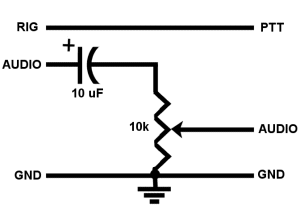
As I mentioned before, one of the reasons I bought the N0XAS PicoKeyer is that it had an MCW mode. In this mode, the RIG output instead of keying a CW transmitter is connected to the PTT input of a VHF/UHF rig to key it. This signal goes low once you start sending and stays low for two word spaces after you stop sending. The audio of the keyer is fed into the microphone input, and it’s this signal that’s actually turned on and off.

Of course, just because the keyer has this capability, doesn’t mean it’s actually easy to implement. For one thing, the keyer iself has no way to connect its audio to an external device. And while the key output (RIG signal) is available via a 1/4-in. phone plug, that’s not necessarily the easiest way to connect it to your rig. Another gotcha is that the audio output level is not necessarily the right level for your radio, either.

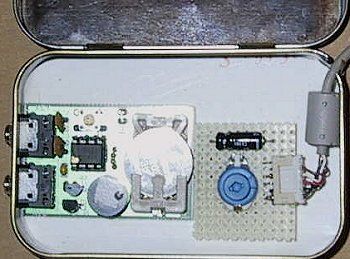
What I did was to cut a piece of perfboard, and mount the components I needed to that board. As you can see in the photo below, the board has a capacitor for decoupling, and a pot to adjust the audio level. To the right of the pot, is a small connector, to which the cable going to the VHF rig connects. Below the photo of the assembly is a schematic.

PicoKeyer with MCW board

PicoKeyer with MCW board

I Like Mice
There’s a cool story behind this connector and the cable. I’m using an Icom IC-207H in my shack. The data connector for this rig is a six-pin mini-DIN plug, exactly the kind of connector used for PC mice. On a club net, I asked if anyone might have a dead mouse they would be willing to part with for this project, and one guy, who works in PC support for a large university, volunteered that he had quite a few of them.

I was prepared to simply snip off the cable and solder the wires directly to the board, but when I dissassembled the mouse, I found that the cable connected to the board via the little header. I unsoldered it from the mouse PCB and super-glued it to the perfboard. the best part is that I didn’t have to fool around with stripping, tinning, and soldering those little wires in the cable.

As I noted earlier, the Pico Keyer does not have pads to easily connect the appropriate signals. What I did was to tack wires on to the bottom of the board and run them over to my MCW board. You can’t see these in the photo. It’s a little bit Mickey Mouse (pun intended), but it works OK.

Another Gotcha
After I built the board, I plugged the thing into my rig. This was kind of late Sunday night, but I was fortunate to find a club member monitoring the repeater on his way home from a weekend trip. I keyed it up, and asked him how it sounded. He said the tone was OK, but that it also sounded noisy. Looking at the power ouptut meter on the rig, it appeared as though the PTT line wasn’t working quite right. I hooked up the scope, and sure enough, that line was not being held constantly low. The result was that the keyer was rapidly keying and unkeying the radio.

The next day I swapped some e-mail with N0XAS, who located the problem, and promised to send me a replacement chip ASAP. It arrived in the mail yesterday. I plugged it in,and it’s now working like a charm.

One thing I might want to add to this circuit is an RC low pass filter to make the output signal less of a square wave and more of a sine wave. The guy who listened to me playing with it yesterday didn’t have any complaints about the tone, though, so that’s not a high priority.

More ham radio stuff at Technorati.Com

Filed Under: CW, Gear/Gadgets

  • « Go to Previous Page
  • Page 1
  • Interim pages omitted …
  • Page 34
  • Page 35
  • Page 36
  • Page 37
  • Page 38
  • Go to Next Page »

Primary Sidebar

No Nonsense Technician Class License Study Guide (for tests given between July 2026 and June 2030)

New No Nonsense Technican Class Study Guide now available!

The 2026 version of my Tech Class study guide is now available, and as always, the PDF version is FREE!. The ePub version costs $11.97, and a Kindle version and paperback version will be available on Amazon shortly.

Click here to get all of my "No Nonsense" study guides.

Also available: The CW Geek's Guide to Having Fun with Morse Code

W5SWL.Com
Retevis Ailunce H1 DMR Radio
DXpander: Cobweb antennas, Laser Cutting

You’ve got mail!

Enter your email address below and get an email every time I publish a new post.

Email


I frequently teach classes to help newcomers get their licenses. The next class will take place on Saturday, October 10, 2026 on the University of Michigan campus. Click here for more information.

If you can't make the class, subscribe to the mailing list to be notified of when the next class will be held.

You can always download my free study guide, and if you have any questions about the classes, or amateur radio in general, please feel free to email me directly.

Support KB6NU.Com

Donate $7.30 and get two of these cool stickers. Measuring 4.25-in. W by 2.75-in. H, it's perfect for your car, your shack, or wherever!

Contact me

If you have a question or comment about one of my blog posts, or a question about any of the material in my study guides, or just a question about ham radio in general, you can email me at [email protected].

Blogs You Should Also Read

  • AE5X: A CW-centric blog from Kingswood, Texas
  • K0LWC Blog
  • LA3ZA Ham Radio Blog
  • Little Radios, Big Fun – WB3GCK
  • Mr. Vacuum Tube's Blog
  • Radio Artisan – K3NG
  • The K0NR Weblog
  • VE3WDM's QRP Ham Radio Blog
  • W2LJ’s Blog

Ham Radio Websites

  • Dashtoons – The Hammin' Comedy by Jeff K1NSS

Podcasts

  • ICQ Podcast
  • Linux in the Ham Schack
  • No Nonsense Amateur Radio Podcast
  • Resonant Frequency Amateur Radio Podcast

Recent Comments

  • Dan KB6NU on Some Ham-Vention History
  • David Pompea on Some Ham-Vention History
  • Walter Underwood on One lump or two (or three)?
  • Mike, KL7MJ on Question pools should make teaching classes easier
  • Karl Heinz - K5KHK on Question pools should make teaching classes easier

Meta

  • Log in
  • Entries feed
  • Comments feed
  • WordPress.org

Footer

Copyright © 2026 Daniel M. Romanchik, KB6NU · Log in