
Last night, in the afterglow of successful sales at the USECA Hamfest on Sunday morning, I was going through the junk I’ve collected over the years, looking for stuff to sell at the next hamfest. One thing that I came across was a Fluke Model 12 multimeter. Fluke gave me this meter to review way back when I was an editor for Test&Measurement World magazine.
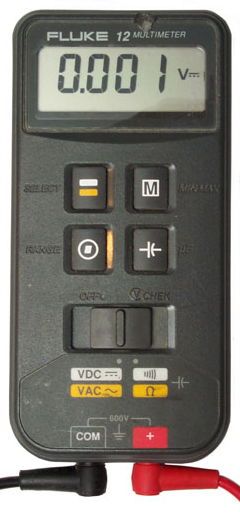 The Fluke 12 is an interesting meter because the controls are so different. Instead of using a big rotary switch found on most DMMs, to choose the measurement type you have to set the slide switch to one of two settings, then hit the button in the upper left-hand corner. In practice, users must have found this a bit confusing as the Fluke 12B, the next model in this line, went back to the big rotary switch.
At any rate, I pulled the meter out of the box, inserted a 9 V battery, and switched it on. I was very disappointed to find that many of the LCD segments were either not working or appeared to be only half on. Not only that, none of the function switches seemed to be working. I tried a different 9 V battery just in case, but got the same results as with the first battery.
At that point, the thought crossed my mind to just chuck it. The meter is at least 25 years old, and even though I rarely used it, it was given to me, so I wasn’t really out any money. After thinking about it a little, though, I thought I’d take it apart to see if there were any obvious problems that I could easily fix.
To get the meter apart, you have to first unscrew four screws from the rear, then lift off the rear part of the case. What you see at this point is the rear of the main board, which snaps into the front part of the case. To find the problem, I was going to somehow extract the main board.
This was easy enough to do. All I needed was a small screwdriver, which allowed me to pry the board from the case. There were even a couple of notches in the PCB to allow one to do this more easily.
 The first thing that I noticed was a set of pads up near the top of the main board. As it turns out, these pads are for the signals that drive the LCD segments. The signals are connected to the LCD via a “flexible, zebra connector strip, as shown at right. The connector strip is made of a spongy silicone material and when the main board is pressed into the front part of the case, this zebra strip connects the main board to the LCD.
Since my first rule of troubleshooting is to check the connections, the first thing that I did was to run my finger along both the pads on the main board and then on the zebra strip. After I did this, I snapped the main board in, and powered up the meter. Like magic, the LCD now had no bad segments.
The function switches still weren’t working, though. I popped the board out again to take a look. Sure enough, there was a smaller zebra strip that connected the main board to the switch board. I ran my finger over the pads on the main board and the zebra strip connector, snapped the board back into the case, and powered up the meter again. I was very happy to see that now the function switches worked as well, and I had a functional DMM.
The point of all this is to encourage you to do a little tinkering with some non-functional electronics that you might have or might be able to get for cheap at some hamfest. Many, if not most, of the problems you’ll encounter are with the connectors and cabling, and a lot of times, these are easy fixes. At best, you’ll have fixed something and now have something useful. At worst, you’ll have learned something for a small investment of time and money.
I have a Fluke 11, which in appearance is pretty much identical to the Fluke 12. It’s probably the cheapest meter Fluke has ever made, and yet it’s given me reliable service for at least 25 years. I’ll keep your repair technique in mind if it ever starts to flake out on me.
The Fluke 11 and the Fluke 12 were both part of the same series. I’m not sure what the difference is between the two models. Can the 11 measure capacitance?
The Fluke 11 measures capacitance, but lacks the min/max function. I’ve got a digital copy of the manual that covers both models, if you need it.
I have the original manual. It was in the box!
I have a 12 that I have used for years. It has survived bouncing around in the back of my truck for most of its life and still performs very well.
WOW – That fixed it completely! Thank You. That little piece of foam is very small – and flew out when I removed the face-plate from the board. When re-assembling, put the foam into the back side of the faceplate and install the board onto that.
indeed your tip worked. my fluke was given to me with a bunch of other inop or unknown status test equipment several years ag. I’m just now getting around to checking it out.
I’ve never seen a connection made that way.
Thanks for sharing.
Cool! I’m glad that I could help. One of my mantras is that 80% or more of electronics failures are due to bad connections, either in a cable or a connector. Always check the cables and connections first.
I’m looking to purchase a fluke 12 meter, email [email protected]