
Partly out of curiosity and partly because Jeff, KE9V, shamed me into it, I setup my Signalink interface, downloaded WSJT-X, and started operating FT-8, the latest “shiny object” from the K1JT team. As you probably know, this mode has really caught on with the digital crowd, and the waterfall is chock full of FT-8 signals. Part of the reason for this is that it has some of the characteristics of JT-65, but is not as excruciatingly slow.
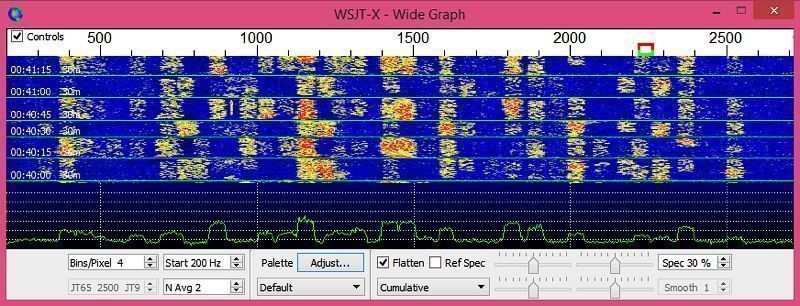
Over the past couple of days, I’ve made 32 QSOs, including a couple of DX contacts. It’s been fun to try something new, but to be honest, I’m not really feeling the magic.
Part of it is that I don’t feel like I’m really doing anything. I downloaded the software, plugged in my digital interface, fooled around with the settings a bit, and then, the computer started making contacts. I have to click a few on-screen controls to make contacts, but even that’s a step that could be easily programmed in by the WSJT-X developers. (In fact, I wonder why they haven’t done that already!)
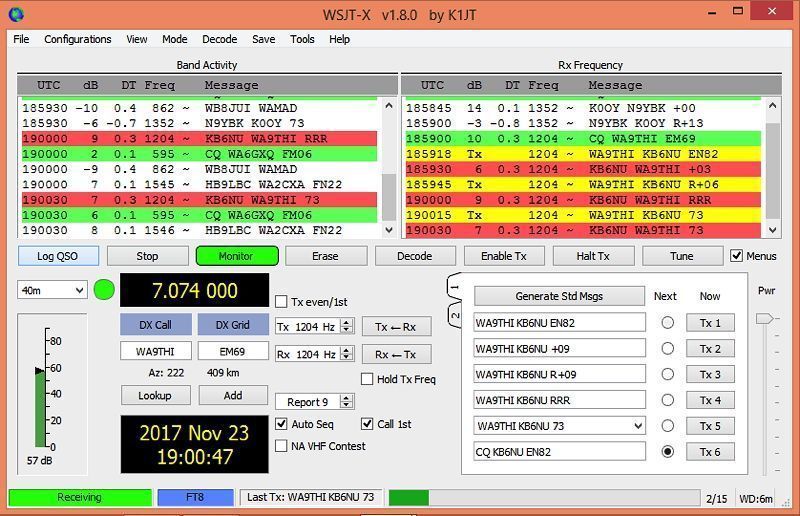
Take a look at the screenshot above to see how a typical contact happens. When a CQ appears in the “Band Activity” window, you double click on it. When you do this, the software begins listening for signals on that frequency. In this case, I double-clicked on the CQ by WA9THI. When I double-clicked on the CQ, the program began decoding signals on that frequency and display the transmissions in the “Rx Frequency” window.
Then, I clicked on “Enable TX” and the program began the contact sequence, sending “WA9THI KB6NU EN82.” EN82 is my grid designator. This is shown as the first yellow line in the Rx Frequency window. The transmissions that I sent are highlighted in yellow. The transmissions sent by WA9THI are highlighted in red.
The sequence of transmissions shown there comprise a complete contact, and that whole process takes less than two minutes. And, once WA9THI received my first transmission, the sequence is all automatic. You just sit there and watch the two computers talk to one another.
While I can certainly appreciate the thought and the work that went into the design of the protocol and programming to implement it, sitting and watching the computers talk to one another just doesn’t excite me. On the other hand, if you’re one of those guys who wants to make contacts, but doesn’t really want to talk to anyone, than this is the mode for you!
Here are a few more notes about FT-8 operation:
- Not surprisingly, synchronizing your computer with the other stations computer is very important. To do that, you need to get your computer to use the network time protocol (NTP). I failed to do this when I first installed WSJT-X, and while my waterfall was full of FT-8 signals, WSJT-X just wouldn’t decode them.
- I got my PC laptop to talk ntp by installing Meinberg NTP software. Once I did that, WSJT-X magically started decoding transmissions.
- Most of the cool guys seem to be using Meinberg NTP, but there are other options. One of the guys in our club is using a program called Dimension 4, for example.
- Apparently, you don’t have to limit your power output as you would with PSK-31. At first, I set my output power to 10 W. I had a bit of success at 10 W, but I expected more. When I asked on Twitter how much power other guys were using, most of them said that they were using more than that.
- For the last couple of sessions, I’ve been setting my output power to 25 W, and I’ve been having more success. I worked my first European on 30m this afternoon, for example.
- Even at 25 W, my signal reports are more often than not not as good as the signal reports I’m handing out. I haven’t figured this one out yet. This doesn’t happen to me when I’m operating CW, so I don’t think it’s my antenna.
- When I’m operating, I write down the calls of stations I’ve contacted. The reason for this is that while WSJT-X does have a logging function, it doesn’t have a log window, so unless you have a great memory, you could end up working guys two or three times a session. That’s probably not a big deal since contacts are so quick, but I’d rather avoid doing that if I can.
- WSJT-X works “split.” While most contacts take place on the same frequency, a station can call you anywhere in the passband of your receiver and WSJT-X will decoded the signal and begin a contact. This threw me the first time or two that this happened, and I tried to change my transmit frequency to match the other station’s. In doing so, I messed up the sequence. I now just let the contact proceed normally, and it works out great.
- When I work the other digital modes, I set my IC-746PRO to the USB-D mode. In this mode, the receive passband is narrower than for working phone. When operating FT-8, however, you don’t want to limit that passband. Signals will appear across the entire 2.6 kHz of the USB signal, and if you narrow the passband, you won’t be able to work those stations.
- WSJT-X checks the validity of call signs. This afternoon, there was a guy who had typed in his call as “WAMAD” and was calling CQ. WSJT-X wouldn’t let me answer that CQ.
- Operating this mode opens up the possibility of working more stations whose callsigns spell words and adding those QSL cards to my collection. I have, for example, already worked K1GUY and N5SLY. I’m guessing that these two guys don’t operate CW.
All told, I’ve found this to be an interesting foray into a new digital mode. While I’m not feeling the magic that some others seem to be feeling when operating FT-8, it certainly will be a change of pace to operate this mode from time to time. Give it a shot and tell me what you think.
Hello Dan, I too don’t feel the magic all the time. But if I see or QSO with a rare DX station even on FT8 I still feel it. I see FT8 as a nice addition to what we already have. I find it also a excellent propagation monitoring mode because there is so much activity worldwide.
“Even at 25 W, my signal reports are more often than not not as good as the signal reports I’m handing out.”
Well, I have the same thing and wrote about it on my blog. It seems digimodes are much used by stations at locations with lots of noise and QRM giving less good reports! But that is not always the case, trying to figure it out as well.
“When I’m operating, I write down the calls of stations I’ve contacted. ”
Search for JT-Alert as an addition to WSJT-X. It will tell you if the station has been worked and much more. However, WSJT-X does change the colors of the call that calls CQ if you worked them and so you know if you worked a station before.
Enjoyed your blogpost, I’m shure it is revealing the FT8 secrets for many…
73, Bas
Hi, Bas. Thanks for the link to JT Alert. I’ll certainly check it out.
Also, point taken about signal reports. I’m blessed with a fairly low noise QTH, so it would make sense that the SNR reports that I give would be higher than the reports given by stations whose noise level is higher.
Like Bas said, the software will color stations worked as green so you will know you’ve worked that station before. But the logging feature was never intended to completely replace your shack log and it’s short on many features. So while it will color a station you’ve already worked as green, it does that based on worked once. If you work me on 80 and later see me on 20, I’ll still be “green” since we’ve worked before. Not very handy if you want to work Morocco on multiple bands, etc.
73, Jeff
Hello,
I have been using FT8 some time ago, but had problems coming through. When using WSPR, which decodes some dBs deeper the standard power at least some months ago was 200 mW. This was kind of QRO. So I used 1 Watt with FT8 and in the beginning it worked as it should. But later more and more OMs with 5 Watt (my limit) chimed in and later on I had no chance when I was blown away with 50 or more Watt.
And I thought that FT8 was also a mode designed for weak signals. So I changed back to CW.
73 de Hajo dl1sdz
Hello,
Thanks Dan, very interessant information.
73´s
Saulo
PY7EG
‘I have to click a few on-screen controls to make contacts, but even that’s a step that could be easily programmed in by the WSJT-X developers.’
This can already be done.
‘I don’t feel the magic.’
I think it’s great to test an antenna or propagation and see where you get, but that’s all for me. There is no magic.
73
I agree that it alert is a nice addition.
However as far as power, I am using an ft817 at 3 watts and have 49 states and 40 countries on ft8.
73
WD5DHK Ray
I love FT-8, My only problem is I can’t seem to work any DX Station. On the other hand I can work DX Station about anytime on SSB. So it can’t be My Station. Or can it ? I’m Running a Kenwood TS-570D into a 80 Meter Dipole up about 37 feet I run between 5-30 watts on FT-8. Any Comments are welcome Why I can’t get across the Pond . 73’s
Seems odd that you can’t widen the receiver pass band on USB-D mode on your 746Pro. I don’t know much about that particular rig, but on my K3, there is a Data-A mode, which is the same as SSB, but it turns off the mic compression and limiting, to avoid distorting the output waveform. And I can maintain a separate receiver bandwidth on a per-mode basis, so flipping back and forth from SSB/CW/DATA is fairly painless. The only thing I find annoying is that I can remember my power output setting on a global (all modes/all bands) basis, or on a per-band basis, but not on a per-mode basis. I’d like to run 100W on SSB/CW and 25W or less on DATA, but I have to manually change it back and forth. I can program ‘macros’, so that’s a partial solution, I suppose.
As far as fully automatic operation, I think that would stray into a gray area as far as the FCC is concerned. There are certain requirements for automatic operation. Running WSPR in ‘beacon’ mode really is supposed to be done with a control operator present, or some means of proper remote control, for instance.
Good point. I didn’t think about whether the rules allowed this type of operation or not. At any rate, the control operator could be present while the computers do their thing.
I worked over 30 station this past Monday. Today I call CQ for two hours and not one reply. Tried running different power. What happened ?
Got me. I’ve not been all that successful with FT-8 myself.
I use Omni Rig together with WSJT-x and my logging program Winlog 32
As Dan said WSJT keeps a log but in my set up WinLog32 also records the contact and prompts you to upload to eqsl.
73
Nick
I think FT8 is not a weak signal mode. I have seen a few posts that are operating with nearly 100 watts. Many years back WSJT7 had a contact mode for Wspr. I made 4 contacts at that time. It takes longer but turnaround time could be shortened Very narrow mode that the use of 10 watts would be a weak signal powerhouse. To me time is not as important as making true weak signal contacts.
.Fred. N9GUE
What OS are you running that you needed a third party app to do NTP?
Just got back from the UK where I visited a London based radio repair shop. They told me they love FT8 because of the number of finals they’re replacing. As a 100% duty cycle mode FT8 is stressing finals when run above 25% of full RF power. For most of us that’s topping out at 25 watts – the max AM output.
I too am not doing the dance here but
I find the mode useful for propagation mapping and, with the help of psk reporter, mapping my antennas as to patterns and nulls.
Until we climb up out of this cycle’s basement it will likely be a very popular means of working DX. Five or six years down the line we’ll see if it has staying power.
Last thought… FT8 is ham radio. That has seemed to me to be a silly argument all along.
73 W3IRL
I will never try FT8. Why?
– because I’m not a computer lover, and doing radio things without it
– because nothing digital I have tried works perfect, of course have no problems with cassette deck, while CD is breaking and computer crashing while listening
– I was a digital lover sometimes, but when we switched to unwatchable digital TV, I found out it makes me nervous every day, actually
– because radio without noise is not a radio
– because I can talk with hams using Facebook, and have the same feeling
– because I have enough of watching people on phones on bus, sitting behind a computer doesn’t seem different to me
– because you can’t appreciate anything digital
– because you actually don’t know is it really talking with someone (as you could on net cheaper), or is it just program fictioning something, as experiment of artificial intelligence (I can see no reason why should we be wasting our time just to invent something what we don’t need)
The last reason, well, probably not, but you can’t know, you don’t feel it.
These are the reasons why FT8 shouldn’t exist, well, as a bad weather modulation yes, but some people are abusing it. I was always be talking, until ham radio is analog, it’s safe, but now it’s not anymore.
LET’S SAVE THE HAM RADIO!
Over the last week or so, I dipped my toes into FT8 and JS8 for the first time. One thing that I noticed is that most reports that I get are weaker than the reports that I give. Several in this group also have reported the disparity in S/N reports. I’m running 35W on FT8 and JS8. I find it hard to believe that the majority of users on these modes are running considerably more power.
On the other hand, on WSPR most of the S/N reports that I get are better than the ones that I give.
73,
Jack K1VT
Agreed, but i have to admit, as a new HAM, its a GREAT way to get your feet wet.
If FT8 disappeared tomorrow it wouldnt be soon enough, absolute no skill cheat mode. Made operators lazy. You dont deserve awards with this mode at all. ARRL needs to step in and stop the automatic FT8.
“I write down the calls of stations I’ve contacted. The reason for this is that while WSJT-X does have a logging function, it doesn’t have a log window, so unless you have a great memory, you could end up working guys two or three times a session.”
You need to get familiar with what the colors on the screen mean. After you’ve worked a station, they’ll show up with a different background color (usually green). Countries you’ve never worked are also indicated in a different color so they stand out. The actual colors used are all configurable in the program. Various settings are available.
Good grief, FT8 may have started with good intentions but now its gotten way out of control. Its definitely not real radio, Its computer radio. And now all the FT8 people are doing it automatically while theyre st work or watching tv. Then they say they got their DXCC, how absurd. Dont give me the bull how its technical and so cutting edge. If youre such a tech guy then make a better antenna or anything to get a better signal
out, not default to a computer. Its killed the hobby and needs to be reigned in by the ARRL or risk losing real hams. Limit FT8 wattage to 5 watts and must hold extra class license. Your little computer contact isnt anything more than two computers talking, zero info exchanged.
CW and Phone are the only real modes, RTTY and PSK not bad but still. Be a real ham and pick up your muc or pound some brass but no digital computer nonsense.