• Skip to primary navigation
  • Skip to main content
  • Skip to primary sidebar
  • Skip to footer

KB6NU's Ham Radio Blog

KB6NU's Ham Radio Blog
  • HOME
  • Study Guides
  • Teach a One-Day Tech Class
  • W8SRC Repeater Guide
  • Advertise
  • Hire Me

IC-7610

It’s almost like I have a new radio

October 10, 2025 By Dan KB6NU Leave a Comment

Man sitting at a picnic table in front of an amateur radio set.
Yours truly hunched over my KX3 at a picnic table at Grand Mere State Park. Photo: Dinesh, AB3DC.

A couple of months ago, Dinesh, AB3DC, and I were talking about our IC-7610s. Both of these radios were early production units and the displays exhibited the “image retention” problem. (Oddly, even though it was widely discussed when the IC-7610s first came out, I wasn’t able to find anything on the internet describing the problem, although there were several posts with the warranty repair notice.)

As we discussed this, it occurred to me that we have an authorized Icom Service Center here in Michigan (SAR Technical Services), and that we might be able to have both radios serviced at the same time and avoid shipping charges by driving the radios over to SARTS. So, I emailed Matt at SARTS and proposed this to him. He was very agreeable to this, and after checking the serial numbers of our units to make sure they qualified for the warranty repair, he replied that it would be a couple of months before he could get the displays.

A couple of weeks ago, I got an email from Matt saying that he now had the parts, and we arranged to bring the radios over to him yesterday, October 9. In order to make sure that he could get both radios serviced, Matt suggested that we get there by 9:00 am. Because it takes about two hours and fifteen minutes to get to St. Joseph, MI, where SARTS is located, from Ann Arbor, MI, where I live, we started out while it was still dark. After an uneventful drive, we got there just after 9:00am and dropped off our radios.

Since we had five or  six hours to kill, I had suggested that we take our POTA gear along and activate a couple of parks. The park closest to St. Joseph is Grand Mere State Park, so we stopped there first, arriving a little before 10:00 am. It’s a rather small park, without a lot of amenities, and as it turns out, it was quite a hike to get to the beach from the parking lot. We got partway in, and after trudging up one sand dune, and finding that it was still a long way to get the to beach, we retreated to a picnic shelter close to the parking lot. We set up my 66-ft. doublet antenna, making sure to avoid any poison ivy, and I made 13 CW contacts in a little less than 20 minutes.  I then passed the antenna over to Dinesh, who made 13 FT-8 contacts in about 25 minutes. We then packed up and headed to Warren Dunes State Park.

Warren Dunes is a great park. Since we were there on a Thursday afternoon in the fall, there weren’t many people there, but I can imagine that it gets quite crowded on a warm summer weekend. You can tell that it was made to hand a lot of people. It even has a gift shop!

Man sitting at a picnic table on the beach at Warren Dunes State Park.
Dinesh, AB3DC, enjoying the sunshine, the beach, and the propagation at Warren Dunes State Park.

We set up on picnic tables just outside a pavilion, and I pounded in the stakes holding up my telescoping mast easily into the sand there. I managed 14 CW contacts in 19 minutes and then passed the antenna over to Dinesh, who made about 20 FT-8 contacts in a little over 20 minutes. By the time we packed up, it was a little after 12:30 pm and time for lunch. We found a little brewpub in a nearby town and enjoyed a glass of beer with our sandwiches.

After lunch, we stopped to charge my friends car (he drives an EV), and just as we were on our way to the charging station, Matt from SARTS called and said that our radios were ready. After charging the car, we headed back to St. Joseph to pick up the radios.

When we got there, Matt explained what he had done. For me, Matt had not only replaced the display, but also the clock battery (free of charge). In addition, he upgraded the firmware to the latest version. The invoice also noted that he tested transmit and receive functions, the antenna tuner and antenna tuner connector, the CI-V connector, and the USB and DVI ports. My friend’s radio received the same services, except his clock battery was good, so it was not replaced.

Matt also replaced the power connector on my radio (he called while we were at Grand Mere SP to get my approval), as the tabs holding it to the back panel had become compressed and was kind of just floating there. The charge for that was $35.

I was pretty tired when I got home, so I took a nap, then ate dinner before hooking the radio back up again. When I did, the first thing I noticed is how bright the screen is. Seriously, it almost feels like I have a new radio. I had to actually turn down the brightness to operate it comfortably.

An amateur radio sitting on a desktop.
My “almost like new” IC-7610 in action.

Having to get a radio serviced is usually a real pain. You have to box it up and hope it gets there in one piece. Then, you have to wait for the radio to be worked on and for it to be shipped back to you. By contrast, this was a really nice experience.  Although the drive was a little long, we were able to get our radios serviced the same day, and we each activated two new parks. The weather even cooperated. I was a little concerned that it would be kind of cool, but with the temperature in the lower 60s, it was just fine. Thanks to my friend who did all the driving and to Matt for a great service experience.

Filed Under: Gear/Gadgets Tagged With: AB3DC, IC-7610, SAR Technicial Services

Buttons are back, baby!

April 21, 2025 By Dan KB6NU 3 Comments

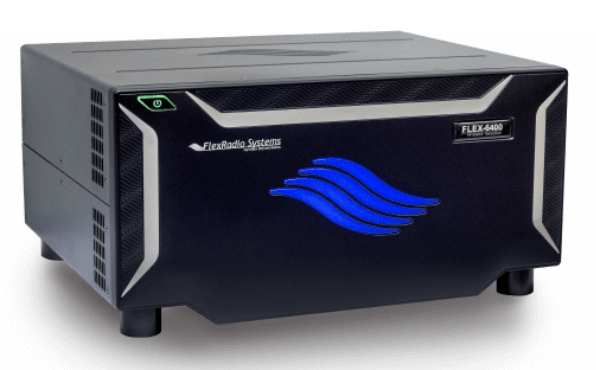
Several years ago, I got a good deal on a Flex 6400 and thought I’d give it a try. It’s a great radio, and I enjoyed using it, but after a couple of years, I decided to give it up and buy an Icom IC-7610 instead. The main reason was the user interface—the IC-7610 has real knobs and buttons instead of just a computer screen to control its functions. Maybe I’m just being old school (I am certainly getting old), but I prefer real knobs and buttons, even if those knobs and buttons are just providing digital inputs to the processor controlling the radio.

Recently, I’ve run across a couple of articles that back me up on this. The first, “Touchscreens are out, and tactile controls are back,” is an interview in IEEE Spectrum with Rachel Plotnick, an associate professor of cinema and media studies at Indiana University in Bloomington, and a leading expert on buttons and how people interact with them.

She says that while touchscreens are a useful interface, people are becoming somewhat fatigued by the use of them. “People seem to have a hunger for physical buttons,” she says, “both because you don’t always have to look at them—you can feel your way around for them when you don’t want to directly pay attention to them—but also because they offer a greater range of tactility and feedback.”

She also said something else I found interesting. “Buttons tend to offer you a really limited range of possibilities in terms of what you can do. Maybe that simplicity of limiting our field of choices offers more safety in certain situations.”

I might say that it also makes the user interface more straightforward and easy to understand and use. Take the receiver incremental tuning (RIT) control, for example. I use this control frequently on my IC-7610, I press a button to turn it on and a knob to set the offset. On the Flex, however, using the SmartSDR software, I’d have to go to the X/RIT menu, click on the RIT button on the screen, then set the offset by clicking right or left arrows or by typing in a text box. It’s just not as simple to do as on the IC-7610, so I found myself using that control less often.

ICOM IC-7610 transceiver
On my IC-7610, the RIT controls are conveniently located in the lower right-hand corner.

The second article is “Subaru is bringing back physical knobs and buttons in its cars.” The article begins, “To the relief of practically anybody who drives a car regularly, Japanese carmaker Subaru has brought back physical buttons and knobs for its 2026 Outback midsize SUV. It’s yet another sign that carmakers are finally starting to listen, ditching massive touchscreens that have taken over a vast number of vehicle controls in favor of tactile buttons, switches, and knobs.”

Of course, touchscreens are the appropriate choice for many transceiver functions. The IC-7610 touch screen not only displays the waterfall, but also lets you select a signal by touching it on the screen. That works great for me.

The lesson to be learned here is that a good user interface can help increase sales. These days, almost all of the radios from the major manufacturers are so good that the average ham can’t really detect a difference in performance. That leaves the user interface as one of the differentiating features, and you’d think that a more usable user interface would sell more radios. And, it appears that physical, tactile buttons and knobs are going to be a part of that user interface.

Filed Under: Gear/Gadgets Tagged With: buttons, IC-7610, Icom

Playing around with wfview

June 18, 2023 By Dan KB6NU 8 Comments

Back when I had an IC-7300, one of the things I lamented is that the display wasn’t bigger. I had heard about wfview, which is open-source software designed to control modern Icom radios, but I never did get around to installing it.

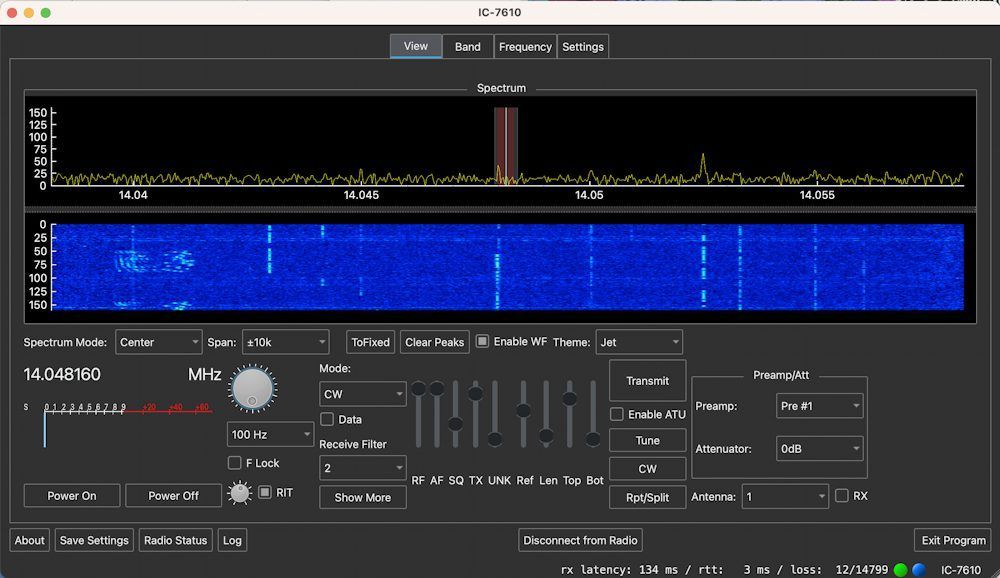
Screenshot of the wfview window. Click to see a larger version.

Then, I purchased a Flex 6400. As far as computer display and control, the Flex is wonderful. You can make the display as big as you want, and all the most commonly-used controls are readily available.

I missed having real knobs and buttons, though, so a couple of months ago, I got a good deal on an Icom IC-7610. I’m an Icom fanboy from way back, but there are some things about computer control that I miss, so I decided to finally download and install wfview.

The download and application install went swimmingly. Getting the program settings correct wasn’t quite so easy, however. For some reason, I just couldn’t seem to get wfview to talk to my radio over the LAN connection. I think that there were a couple reasons for this:

  • wfview was originally written to control IC-7300s over the USB port.
  • The document could be a little more explicit.
  • Operator error (namely me)

Let me give you an example. On the Getting Started page, it says to “Enter the [6] username as set on the radio,” where [6] is a text box labelled “Username.” What the documentation doesn’t say is that what you should type into this box is the value that’s entered as “Network User1 Name” on the radio.

What really tripped me up is figuring out the IP address of the radio. In the wfview forum topic IC-7610 Connect Over LAN, I was asked what my radio’s IP address was and if I could ping it from my computer. To make a long story short, the radio’s IP address is found on the radio under Settings -> Network -> DHCP. I suppose that this is a logical assumption, but it just didn’t occur to me.

So anyway, after fiddling with it for a couple of hours probably, and enlisting the help of a friend of mine who knows more about networking than I do, I finally got it running. I do like being able to make the display bigger than the display on the radio. I also like the ability to set some parameters by just clicking. For example, it’s nice to be able to select the displayed frequency span by just selecting from a drop-down menu, rather than cycling through the options by pressing a button on the front panel. For the most part, though, I’m not sure that it offers users much, if you’re going to run it on the shack computer.

Where I do think it will come in handy is on my MacBook laptop. I installed it on the laptop, and was easily able to access the computer via WiFi. Now, I can operate the radio from my deck on a nice summer day.

Unfortunately, I can’t seem to operate CW, though. One of wfview’s features is what they call the CW sender. Unfortunately, the CW sender isn’t quite as finished as the rest of the software, and this limits its usefulness. Apparently, it’s prone to crashing. I did get it to send QRL?, but then it wouldn’t send CQ for me. I’m looking forward to the next release, which is supposed to fix these bugs and add some cool CW operating features.

Filed Under: Software Tagged With: IC-7610, wfview

First impressions: IC-7610 vs. Flex 6400

February 7, 2023 By Dan KB6NU 9 Comments

A little over three years ago, I got a pretty good on a Flex 6400. So, although I’ve been an Icom guy since the 1980s, I bought the Flex and sold my IC-7300.

Flex 6400

The Flex is a great radio, but after three years, I got a hankering for a radio with real buttons and knobs. The obvious choice for me was the IC-7610. I’d been thinking of getting one for more than a year now, but got serious about looking for one about three weeks ago.

My first stop was QRZ.Com Swapmeet. I had really only intended to see how much used IC-7610s were going for, but found someone selling one for $2,300. I noted that there were a couple of guys already interested in purchasing it, but I emailed the seller and told him that if neither of them came through with the cash, that I’d buy it from him.

A day or two later, he emailed back saying that both of them decided not to buy it after all, and if I still wanted it that it was mine. I sent him a cashier’s check for $2,378 (shipping was $78), and about a week and a half ago, it was delivered to my door.

Honestly, I was a little concerned about buying it sight unseen. Yes, there were pictures on QRZ.Com, and it did look like a well cared for radio, but unless you can play with it, you don’t really know if there are any problems or not. I was relieved that when I took everything out of the box (which, by the way, was the original packaging) that everything looked to be in mint condition. There wasn’t a single scratch on the radio.

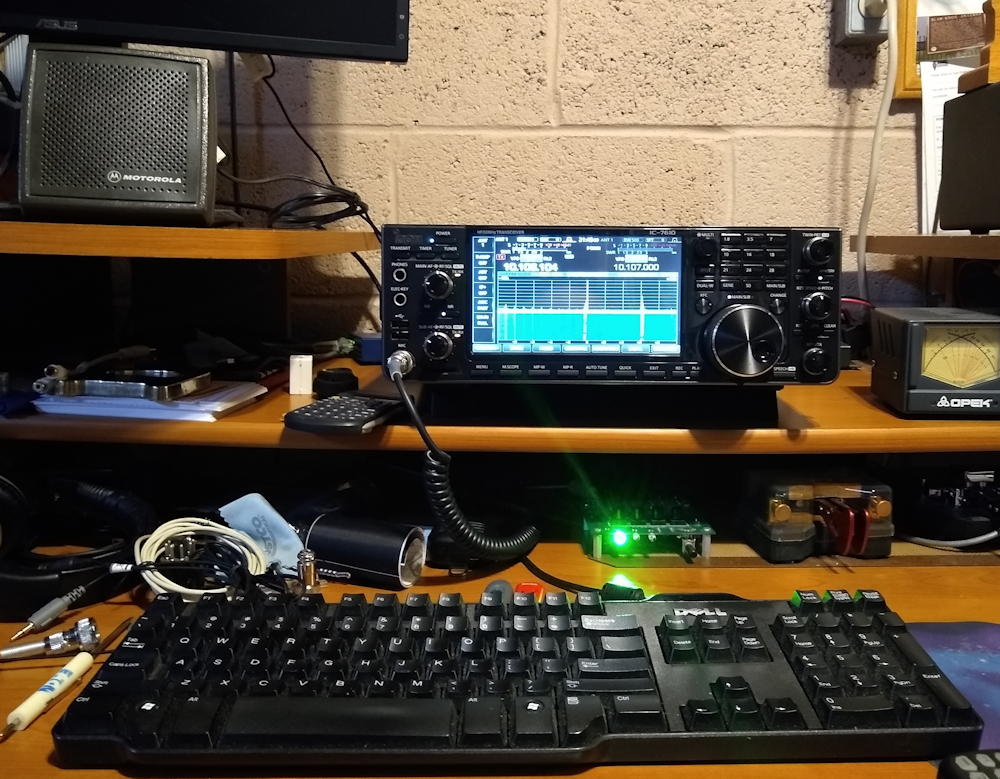
The next day, I crimped some PowerPoles onto the power cable, disconnected the Flex, and installed the IC-7610 on my operating desk. I had to either make or find the proper cables to connect the headphones and key to the rig (the Flex used 1/8-in. phone jacks while the IC-7610 still uses 1/4-in. phone jacks for these two connectors), but once I got those in place, I was ready to roll.

My new (to me) on my operating desk.

So, here are some first impressions:

  1. I love being able to use my Motorola speaker again. I wasn’t able to use it with the Flex because the Flex requires an amplified speaker. I chose some amplified PC speakers based on recommendations on the Flex mailing list, but I was never happy with the sound. They’re probably great PC speakers, but for ham radio, especially CW, the Motorola speaker is much better. It has a nice, crisp sound.
  2. The IC-7610 receiver is definitely quieter than the Flex receiver. I noticed that when I changed from the IC-7300 to the Flex, too. Of course, that may mean it’s more sensitive. I don’t really have the equipment to test that out.
  3. The Flex bandscope is a lot more flexible than the IC-7610 bandscope. The IC-7610 bandscope has only a select number of spans, while the Flex bandscope span is continuously variable. I really like that feature. On the computer monitor, the display is larger, too. You can hook up a bigger monitor to the IC-7610, but I haven’t tried that yet.
  4. With the Flex, you can display all of the meters in one window, while the bandscope is in another. The IC-7610 crams all this information into a smaller screen, meaning that you can’t see it all at the same time.
  5. The Flex has a separate setting for output power when tuning, while the IC-7610 does not. So, if you want to reduce the output power when using the IC-7610, you have turn it down, tune, then turn it back up.
  6. The Flex has separate outputs for the speaker and the headphones, and you can turn them on or mute them separately. This is nice if you switch often between headphones and speaker, as you don’t have to keep plugging and unplugging the headphones.  You can also use the headphones while a visitor in the shack is listening to the speaker.
  7. The effort to set up the radios with third-party software, such as N1MM contest logging software, is pretty much a wash. I did have to install the Icom USB drivers, but that wasn’t a big problem.
  8. The SWR meters read differently on the two radios. I’m not really sure why. I should have connected an external meter and compared readings before I disconnected the Flex.

Overall, these are two great radios, but they do offer two distinct operating experiences. I think that as we move forward, it’s the user experience that is really going to differentiate products. They’re all going to offer great performance, so it’s the ergonomics that’s going to become important.

Filed Under: Gear/Gadgets Tagged With: Flex 6400, IC-7610

Primary Sidebar

No Nonsense Technician Class License Study Guide (for tests given between July 2026 and June 2030)

New No Nonsense Technican Class Study Guide now available!

The 2026 version of my Tech Class study guide is now available, and as always, the PDF version is FREE!. The ePub version costs $11.97, and a Kindle version and paperback version will be available on Amazon shortly.

Click here to get all of my "No Nonsense" study guides.

Also available: The CW Geek's Guide to Having Fun with Morse Code

W5SWL.Com
Retevis Ailunce H1 DMR Radio
DXpander: Cobweb antennas, Laser Cutting

You’ve got mail!

Enter your email address below and get an email every time I publish a new post.

Email


I frequently teach classes to help newcomers get their licenses. The next class will take place on Saturday, October 10, 2026 on the University of Michigan campus. Click here for more information.

If you can't make the class, subscribe to the mailing list to be notified of when the next class will be held.

You can always download my free study guide, and if you have any questions about the classes, or amateur radio in general, please feel free to email me directly.

Support KB6NU.Com

Donate $7.30 and get two of these cool stickers. Measuring 4.25-in. W by 2.75-in. H, it's perfect for your car, your shack, or wherever!

Contact me

If you have a question or comment about one of my blog posts, or a question about any of the material in my study guides, or just a question about ham radio in general, you can email me at [email protected].

Blogs You Should Also Read

  • AE5X: A CW-centric blog from Kingswood, Texas
  • K0LWC Blog
  • LA3ZA Ham Radio Blog
  • Little Radios, Big Fun – WB3GCK
  • Mr. Vacuum Tube's Blog
  • Radio Artisan – K3NG
  • The K0NR Weblog
  • VE3WDM's QRP Ham Radio Blog
  • W2LJ’s Blog

Ham Radio Websites

  • Dashtoons – The Hammin' Comedy by Jeff K1NSS

Podcasts

  • ICQ Podcast
  • Linux in the Ham Schack
  • No Nonsense Amateur Radio Podcast
  • Resonant Frequency Amateur Radio Podcast

Recent Comments

  • Dan KB6NU on The EMF Explorer: A badge for ham radio?
  • Travis Good on The EMF Explorer: A badge for ham radio?
  • MARTIN ROBERT ROTHFIELD on The EMF Explorer: A badge for ham radio?
  • Mike Chen on Operating Notes, January 5, 2026
  • Rob W4ZNG on The EMF Explorer: A badge for ham radio?

Meta

  • Log in
  • Entries feed
  • Comments feed
  • WordPress.org

Footer

Copyright © 2026 Daniel M. Romanchik, KB6NU · Log in