
• Skip to primary navigation
  • Skip to main content
  • Skip to primary sidebar
  • Skip to footer

KB6NU's Ham Radio Blog

KB6NU's Ham Radio Blog
  • HOME
  • Study Guides
  • Teach a One-Day Tech Class
  • W8SRC Repeater Guide
  • Advertise
  • Hire Me

Flex 6400

First impressions: IC-7610 vs. Flex 6400

February 7, 2023 By Dan KB6NU 1 Comment

A little over three years ago, I got a pretty good on a Flex 6400. So, although I’ve been an Icom guy since the 1980s, I bought the Flex and sold my IC-7300.
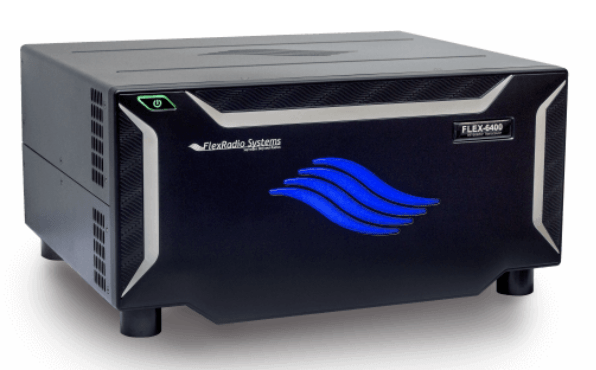
Flex 6400

The Flex is a great radio, but after three years, I got a hankering for a radio with real buttons and knobs. The obvious choice for me was the IC-7610. I’d been thinking of getting one for more than a year now, but got serious about looking for one about three weeks ago.

My first stop was QRZ.Com Swapmeet. I had really only intended to see how much used IC-7610s were going for, but found someone selling one for $2,300. I noted that there were a couple of guys already interested in purchasing it, but I emailed the seller and told him that if neither of them came through with the cash, that I’d buy it from him.

A day or two later, he emailed back saying that both of them decided not to buy it after all, and if I still wanted it that it was mine. I sent him a cashier’s check for $2,378 (shipping was $78), and about a week and a half ago, it was delivered to my door.

Honestly, I was a little concerned about buying it sight unseen. Yes, there were pictures on QRZ.Com, and it did look like a well cared for radio, but unless you can play with it, you don’t really know if there are any problems or not. I was relieved that when I took everything out of the box (which, by the way, was the original packaging) that everything looked to be in mint condition. There wasn’t a single scratch on the radio.

The next day, I crimped some PowerPoles onto the power cable, disconnected the Flex, and installed the IC-7610 on my operating desk. I had to either make or find the proper cables to connect the headphones and key to the rig (the Flex used 1/8-in. phone jacks while the IC-7610 still uses 1/4-in. phone jacks for these two connectors), but once I got those in place, I was ready to roll.
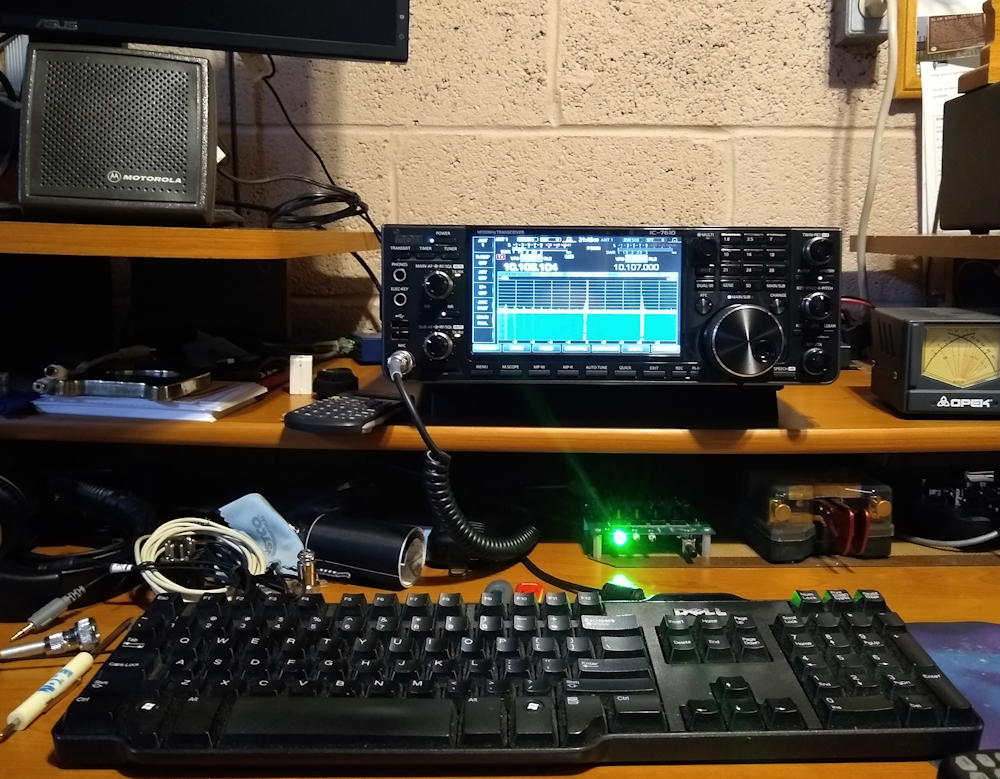
My new (to me) on my operating desk.

So, here are some first impressions:

  1. I love being able to use my Motorola speaker again. I wasn’t able to use it with the Flex because the Flex requires an amplified speaker. I chose some amplified PC speakers based on recommendations on the Flex mailing list, but I was never happy with the sound. They’re probably great PC speakers, but for ham radio, especially CW, the Motorola speaker is much better. It has a nice, crisp sound.
  2. The IC-7610 receiver is definitely quieter than the Flex receiver. I noticed that when I changed from the IC-7300 to the Flex, too. Of course, that may mean it’s more sensitive. I don’t really have the equipment to test that out.
  3. The Flex bandscope is a lot more flexible than the IC-7610 bandscope. The IC-7610 bandscope has only a select number of spans, while the Flex bandscope span is continuously variable. I really like that feature. On the computer monitor, the display is larger, too. You can hook up a bigger monitor to the IC-7610, but I haven’t tried that yet.
  4. With the Flex, you can display all of the meters in one window, while the bandscope is in another. The IC-7610 crams all this information into a smaller screen, meaning that you can’t see it all at the same time.
  5. The Flex has a separate setting for output power when tuning, while the IC-7610 does not. So, if you want to reduce the output power when using the IC-7610, you have turn it down, tune, then turn it back up.
  6. The Flex has separate outputs for the speaker and the headphones, and you can turn them on or mute them separately. This is nice if you switch often between headphones and speaker, as you don’t have to keep plugging and unplugging the headphones.  You can also use the headphones while a visitor in the shack is listening to the speaker.
  7. The effort to set up the radios with third-party software, such as N1MM contest logging software, is pretty much a wash. I did have to install the Icom USB drivers, but that wasn’t a big problem.
  8. The SWR meters read differently on the two radios. I’m not really sure why. I should have connected an external meter and compared readings before I disconnected the Flex.

Overall, these are two great radios, but they do offer two distinct operating experiences. I think that as we move forward, it’s the user experience that is really going to differentiate products. They’re all going to offer great performance, so it’s the ergonomics that’s going to become important.
Filed Under: Gear/Gadgets Tagged With: Flex 6400, IC-7610

Flex on the fritz

January 1, 2021 By Dan KB6NU 3 Comments

A couple of days ago, my Flex 6400 decided that it didn’t want to work. I usually leave the radio and computer on, so when I sit down to operate, I hit the spacebar on the computer’s keyboard, and everything comes back to life. I did so this time, and the radio came up on the 30m the band that I last operated.

When I changed bands to 40m, though, the panadapter went blank, and the SDR program said that the radio had been disconnected. I tried turning the radio off and on, and I even turned the router off and on, but neither got the radio to connect again. I thought, OK, I’ll turn the power supply off and on again. Well, that didn’t coerce the radio to connect either.

When you first turn on a Flex, the light behind the power switch flashes green until the radio boots up. Then it turns solid green……unless there’s a problem. Mine flashed red, with a single flash, indicating that there was a “fan failure.”

One of the first things that I did was to search the FlexRadio Community. In doing so, I found the post, “Fan Failure 6600M.” There was some good information in this post, including where to get a replacement fan. Apparently, these fans are used in gaming, and replacement fans only cost $18 on Amazon.

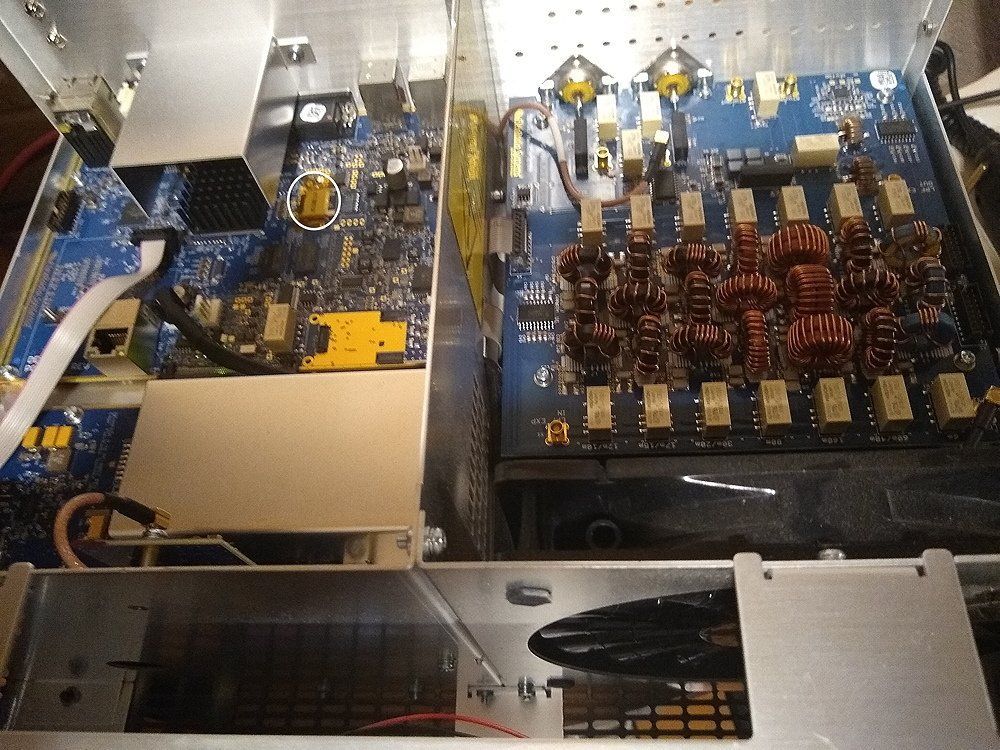
At that point, I decided to take off the cover and have a look. This turned out to be more involved than I thought, as you have to remove 14 Torx screws to get the cover off. Fortunately, I had the correct Torx screwdriver. Once I got the cover off, I spun the fan manually, and it spun quite nicely.

Inside the Flex 6400. At the lower right is the fan. Circled is the SD card referred to in the text.

Next, I kept reading the post. Further down, Ken, N7HQ, the FlexRadio Community Manager, replied:

Please keep in mind a red-blinking power button (single red blink) indicates the fan is not rotating when firmware expects it to be.  Yes, this could be a fan failure, but it is far more likely to be another problem.  In the past 6-months, I’ve seen the service team deal with only a single fan replacement for the 6600 and 6400 radios. And that replacement was preventative, due to the radio being used in an exceptionally dusty/dirty/smoky environment. Please open a helpdesk request. Where Tim and Ken can assist in the diagnosis.

So, that’s what I did. After swapping some emails, Ken, NM9P, asked me to do a factory reset, which I hadn’t done before. When this procedure yielded the same results, he said, “It is possible that there has been an SD card failure and it needs to be replaced. ” He then made arrangements for a new SD card to be sent to me at no charge. (The SD card is circled in white in the photo above.

So, while it’s a bad thing that the SD card failed, I have to give kudos to the tech support folks for their help in resolving the issue. Now, I’m hoping that the envelope containing the SD card doesn’t take too long to make it through the mess that is the U.S. Postal Service right now.

Filed Under: Gear/Gadgets Tagged With: Flex 6400

Operating notes: Working W1EAT on Thanksgiving, playing down to the competition

November 27, 2020 By Dan KB6NU Leave a Comment

Appropriately enough for Thanksgiving, last night I worked Tom, W1EAT. When I asked him if he’d had a big Thanksgiving meal, he said that he and his wife were taking the opportunity afforded by the pandemic to lose weight, and that, in fact, he’d lost 20 pounds since March. When I mentioned that I’d made a pumpkin pie, he said that he didn’t even have any dessert this year!

Here’s  Tom’s QSL from a previous contact. This QSL card, of course, is part of my collection of QSLs from stations whose call signs spell words.

W1EAT QSL

Downside to having a good receiver

The Flex 6400 really has a fine receiver. More than once, I’ve had someone sign off on me, complaining that I was too weak or that my signal was fading, while his signal, though perhaps weak, was perfectly copyable. Of course, it could be that my signal was sub-par, but more often than not, they’re using an older rig, or often a compromise antenna.

Playing down to the competition

It seems that whenever I work someone who is making a lot of mistakes sending, my fist seems to deteriorate as well. Conversely, when someone is sending very good code, I’m motivated to send as well as I can, too.

I suppose something similar happens on phone. When you’re working someone who is a good operator, and by that I mean following good operating practices, such as speaking at an appropriate volume, using phonetics to identify, and so forth, you’re also motivated to do the same.

The moral of the story is that we should all strive to use good operating practices whenever we’re on the air.


Filed Under: CW, Operating Tagged With: Flex 6400

Primary Sidebar

No Nonsense Technician Class License Study Guide (for tests given between July 2026 and June 2030)

New No Nonsense Technican Class Study Guide now available!

The 2026 version of my Tech Class study guide is now available, and as always, the PDF version is FREE!. The ePub version costs $11.97, and a Kindle version and paperback version will be available on Amazon shortly.

Click here to get all of my "No Nonsense" study guides.

Also available: The CW Geek's Guide to Having Fun with Morse Code

W5SWL.Com
Retevis Ailunce H1 DMR Radio
DXpander: Cobweb antennas, Laser Cutting

You’ve got mail!

Enter your email address below and get an email every time I publish a new post.

Email


I frequently teach classes to help newcomers get their licenses. The next class will take place on Saturday, October 10, 2026 on the University of Michigan campus. Click here for more information.

If you can't make the class, subscribe to the mailing list to be notified of when the next class will be held.

You can always download my free study guide, and if you have any questions about the classes, or amateur radio in general, please feel free to email me directly.

Support KB6NU.Com

Donate $7.30 and get two of these cool stickers. Measuring 4.25-in. W by 2.75-in. H, it's perfect for your car, your shack, or wherever!

Contact me

If you have a question or comment about one of my blog posts, or a question about any of the material in my study guides, or just a question about ham radio in general, you can email me at [email protected].

Blogs You Should Also Read

  • AE5X: A CW-centric blog from Kingswood, Texas
  • K0LWC Blog
  • LA3ZA Ham Radio Blog
  • Little Radios, Big Fun – WB3GCK
  • Mr. Vacuum Tube's Blog
  • Radio Artisan – K3NG
  • The K0NR Weblog
  • VE3WDM's QRP Ham Radio Blog
  • W2LJ’s Blog

Ham Radio Websites

  • Dashtoons – The Hammin' Comedy by Jeff K1NSS

Podcasts

  • ICQ Podcast
  • Linux in the Ham Schack
  • No Nonsense Amateur Radio Podcast
  • Resonant Frequency Amateur Radio Podcast

Recent Comments

  • Mir Labs on Ten Steps to Mastering Morse Code
  • Skip K4EAK on Is the ARRL finally feeling the heat?
  • Victor on 468: Ham Radio’s Magic Number
  • Goody K3NG on Not1MM now working on my Linux box!
  • Mir Labs on JA1NUT: Two Issues in Morse Code Learning

Meta

  • Log in
  • Entries feed
  • Comments feed
  • WordPress.org

Footer

Copyright © 2026 Daniel M. Romanchik, KB6NU · Log in