This is the third installment of my adventure converting my shack computer to Linux. Click below to read the other installments:
Not1MM is a no-go
Yesterday, the first program that I attempted to install on my Linux Mint computer was Not1MM. As reported in the comments section of Part 2, Not1MM doesn’t seem to want to run on this computer. It installs just fine, but when I try to run it, I get the error message, “Incompatible processor. The Qt build requires the following features: sse4.2 popcnt.”
I swapped some email and toots on Mastodon with K6TGE, Not1MM’s author, but it looks like I’m just out of luck. As Mike, VE9KK, wrote:
Unfortunately there is no software fix for SSE4.2 (streaming SIMD ext 4.2) or POPCNT (population count instruction). From my research is seems your CPU is to old and Not1MM will run on it. I have read that you can look for older versions of Not1MM and see if they will run but then you are limited to that version. If you want to upgrade the PC then you should be good to go. From online searching it seems Intel i5/i7 4th gen or AMD 3/5 or 7 series.
Oh well….This computer was a refurb when I bought it five or six years ago. Perhaps it is time to upgrade the hardware. And getting something with a solid-state drive (SSD) should make everything run much faster as well.
wfview, Fldigi
Last night, I installed two new programs—WFView and FLdigi. I installed both with Linux Mint’s Software Manager. The installation process was easy-peezy, as you might expect.
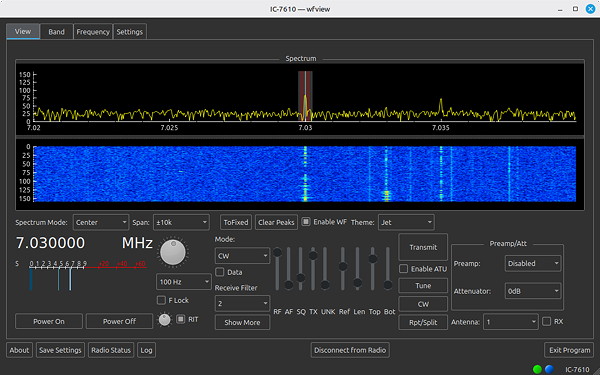
wfview is free and open source software that allows you to control modern Icom and Kenwood ham radios. The operating screen, shown above, allows you to do pretty much anything that you can do via the IC-7610’s front panel. One feature that I really like is the drop-down menu for the bandscope span. On the radio, you have to keep pressing the SPAN button until you get the span you want. With wfview, you just select it from the drop-down menu.
The bandscope doesn’t look as good as it does on the radio, but that’s OK. And, you can tell that there’s some lag between the display on the radio and on the computer. I would guess that if I did upgrade the hardware, the display would be a little less laggy.
Fldigi is software that allows you to operate a number of digital modes, including DominoEX, MFSK16, PSK31, and RTTY. I didn’t have a chance to configure and play with Fldigi, but I’d expect it to work OK.
One odd thing that I noticed after installing wfview and Fldigi is that QLog stopped talking to the radio. “Here we go again,” I thought. The first thing that I did was to quit and restart QLog. QLog would fetch the correct frequency and mode from the IC-7610 when it started up, but then seemed to disconnect from the radio.
Next, I tried rebooting the operating system and got the same results. After the reboot, QLog would fetch the correct frequency and mode from the IC-7610, but then disconnect from the radio.
Finally, I decided to run “sudo apt update.” This command updated some things and then said something like, “There are some packages which can be upgraded.” I ran “sudo apt upgrade,” and the computer upgraded some stuff. After that, QLog stayed connected to the radio, so I was happy about that. And, the updates and upgrades didn’t seem to affect either wfview or Fldigi.