• Skip to primary navigation
  • Skip to main content
  • Skip to primary sidebar
  • Skip to footer

KB6NU's Ham Radio Blog

KB6NU's Ham Radio Blog
  • HOME
  • Study Guides
  • Teach a One-Day Tech Class
  • W8SRC Repeater Guide
  • Advertise
  • Hire Me

Computers

Converting the shack computer to Linux, Part 4: WSJT-X

November 6, 2025 By Dan KB6NU Leave a Comment

I’m not a big FT-8 user, but what shack computer would be complete without an installation of WSJT-X? So, last night I installed the program. After selecting the correct audio input, I was seeing and decoding FT-8 signals on 20 meters.
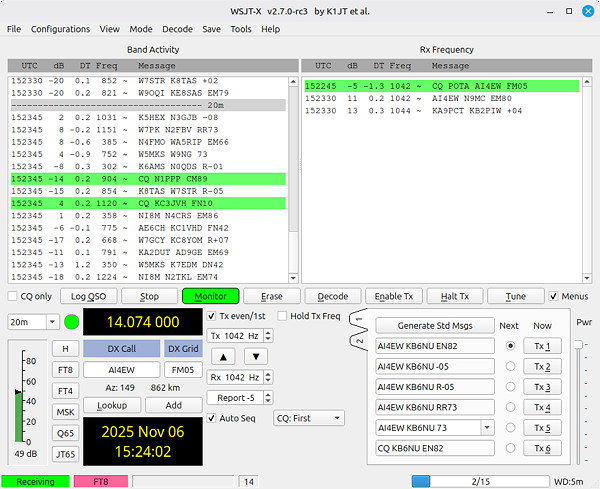
WSJT-X screen shot.
After selecting the appropriate audio input, I was receiving and decoding FT8 signals.

Even though I was receiving and decoding signals, I could see that the received audio level was a little low. A level of 30 dB is recommended (with the antenna disconnected), but mine was down near 18 dB. To get this up to 30 dB, you have to increase the USB AF/IF Output on the IC-7610,

To do this, you press the MENU button, then on the screen, press SET->Connectors->USB AF-IF Output Level->AF Output Level, then set the level. I set the level to 20%, and that did the trick.

Setting up for transmit

I tried selecting a station calling CQ and then replying to it, but I wasn’t getting any output. I found this YouTube video, “How to set up FT8 with WSJT X on the IC-7610 via USB,” which helped me get the application and the IC-7610 set up properly, but because the installation was on a Windows box, it didn’t really give me all the info that I needed.

In particular, I found that I had to set the USB MODLevel to a much different value than shown in the video. To set this level, you press the MENU button, then on the screen, press SET->Connectors->MOD Input->USB MOD Level, then set the level.

This level was set very low, so it’s no wonder that I wasn’t getting any power output.  I set this value to 15%, but noticed that I was getting some ALC. I reduced the value to 10%, and voila, I was transmitting. I made my first contact with KQ4VOB shortly afterwards. As I’m sitting here in the shack, I just made a contact with N3FAR, hopefully another QSL for my collection of QSLs from stations whose callsigns spell words.

Even though I’m making contacts, I’m still not quite sure that I have the otuput levels set quite right. I’m going to have to consult with some of the folks in our club who are more experienced FT8 operators.

I’m still want to work meteor scatter, too, and WSJT-X has a mode—MSK 144—for doing just that. The Leonid meteor shower has started already; it’s expected to peak November 16-17.  The Geminid meteor shower will peak in the middle of December. K5ND has a great page on how to work meteor scatter using WSJT-X.

Filed Under: Computers, Software Tagged With: FT8, WSJT-X

Converting the shack computer to Linux, Part 3: Not1MM, WFView, and FLdigi

November 1, 2025 By Dan KB6NU 2 Comments

This is the third installment of my adventure converting my shack computer to Linux. Click below to read the other installments:

  • Part 1: QLog
  • Part 2: Andy’s Ham Radio Linux

Not1MM is a no-go

Yesterday, the first program that I attempted to install on my Linux Mint computer was Not1MM. As reported in the comments section of Part 2, Not1MM doesn’t seem to want to run on this computer. It installs just fine, but when I try to run it, I get the error message, “Incompatible processor. The Qt build requires the following features: sse4.2 popcnt.”

I swapped some email and toots on Mastodon with K6TGE, Not1MM’s author, but it looks like I’m just out of luck. As Mike, VE9KK, wrote:

Unfortunately there is no software fix for SSE4.2 (streaming SIMD ext 4.2) or POPCNT (population count instruction). From my research is seems your CPU is to old and Not1MM will run on it. I have read that you can look for older versions of Not1MM and see if they will run but then you are limited to that version. If you want to upgrade the PC then you should be good to go. From online searching it seems Intel i5/i7 4th gen or AMD 3/5 or 7 series.

Oh well….This computer was a refurb when I bought it five or six years ago. Perhaps it is time to upgrade the hardware. And getting something with a solid-state drive (SSD) should make everything run much faster as well.

wfview, Fldigi

Last night, I installed two new programs—WFView and FLdigi. I installed both with Linux Mint’s Software Manager. The installation process was easy-peezy, as you might expect.

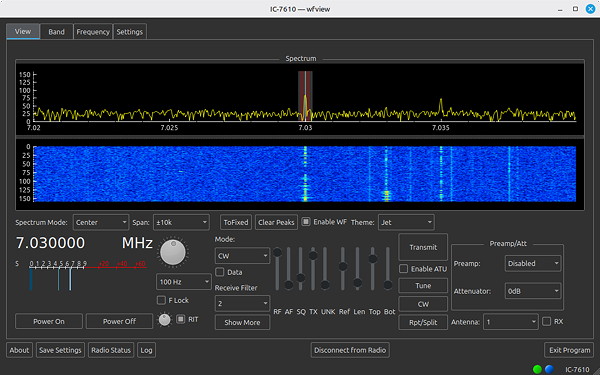
Screen shot of WFView controlling an IC-7610
WFView provides a very nice set of controls for the IC-7610. You can do pretty much everything with this screen that you can do on the radio.iew 

wfview is free and open source software that allows you to control modern Icom and Kenwood ham radios. The operating screen, shown above, allows you to do pretty much anything that you can do via the IC-7610’s front panel. One feature that I really like is the drop-down menu for the bandscope span. On the radio, you have to keep pressing the SPAN button until you get the span you want. With wfview, you just select it from the drop-down menu.

The bandscope doesn’t look as good as it does on the radio, but that’s OK. And, you can tell that there’s some lag between the display on the radio and on the computer. I would guess that if I did upgrade the hardware, the display would be a little less laggy.

Fldigi is software that allows you to operate a number of digital modes, including  DominoEX, MFSK16, PSK31, and RTTY. I didn’t have a chance to configure and play with Fldigi, but I’d expect it to work OK.

One odd thing that I noticed after installing wfview and Fldigi is that QLog stopped talking to the radio. “Here we go again,” I thought. The first thing that I did was to quit and restart QLog. QLog would fetch the correct frequency and mode from the IC-7610 when it started up, but then seemed to disconnect from the radio.

Next, I tried rebooting the operating system and got the same results. After the reboot, QLog would fetch the correct frequency and mode from the IC-7610, but then disconnect from the radio.

Finally, I decided to run “sudo apt update.” This command updated some things and then said something like, “There are some packages which can be upgraded.” I ran “sudo apt upgrade,” and the computer upgraded some stuff. After that, QLog stayed connected to the radio, so I was happy about that. And, the updates and upgrades didn’t seem to affect either wfview or Fldigi.

Filed Under: Computers, Software Tagged With: Fldigi, Not1MM, wfview

Converting the shack computer to Linux, Part 2: Andy’s Ham Radio Linux

October 30, 2025 By Dan KB6NU 5 Comments

As part of my effort to get QLog running the way I wanted on my Linux Mint computer, I asked for help on Mastodon. There, someone suggested that I might want to run the Andy’s Ham Radio Linux (AHRL) script to install a bunch of ham radio software in one swell foop. That sounded like a good idea, so I gave it a go.

It didn’t work out as well as I’d hoped, though. For example, one of the problems that I encountered was that whenever I inserted a USB stick into the computer, it would automatically start the Chirp program!

I contacted Andy, KB1OIQ, about this, and he pointed me to a bug report on his Sourceforge site. Unfortunately, the fix noted there didn’t work on my installation. We went back and forth on this a couple of times, but in the end, I decided that it wasn’t worth pursuing any further. Instead, I re-installed the operating system, the Vivaldi web browser, and the QLog logging program.

This time, of course, the installation went much more smoothly. Armed with my experience from the previous installation, it took me less than an hour to get back to where I was before the AHRL installation.

When I reported this on Mastodon, several folks there advised me to forget about scripts like this, and do the installations myself, one by one. I can see the wisdom in this now. I would have loved for this to work, and Andy’s done a great job with his script, but it’s next to impossible to account for all of the different configurations out there.

Filed Under: Computers, Software Tagged With: Andy's Ham Radio Linux

Converting the shack computer to Linux, Part 1: QLog

October 27, 2025 By Dan KB6NU 3 Comments

As you may know, Microsoft ended support for Windows 10 on October 14, 2025. This means that it will no longer provide technical assistance, feature updates or  security updates. This has prompted me to bite the bullet and convert the  Windows box I use in my shack to Linux.

On October 14, I received an email from iFixit titled, “Windows 10 is Dead.” The email contained a link to an article on the iFixit website that explained how to install Linux Mint on your PC. It looked easy enough, so I decided to give it a go.

I downloaded the .iso file and verified the download according to the instructions, but I ran into a snag creating the bootable USB drive. First of all, iFixit suggests using the Fedora Media Writer. I’d used Balena Etcher in the past to create bootable USBs, and when I saw that the installation instructions on the Linux Mint website also suggested using Balena Etcher, I switched over to their instructions.

Unfortunately, I wasn’t successful on my my first to create a bootable USB. I tried putting it on a USB drive that I’d used to install Linux on an old iMac, but that just didn’t work. I couldn’t even re-format the the USB stick. It did work the second time, after I purchased some new USB drives. I’m not sure why I couldn’t reformat the old drive, but no matter, I just tossed it.

Next, I backed up the data on the Windows box. This wasn’t difficult as I don’t keep a lot of data on it. I exported my log data to an ADIF file to another USB drive, then copied some random data files, such as the PDF file of my IC-7610 operating manual.

After that, the install went pretty well. I decided not to try to make the machine a dual-boot computer and just installed Linux Mint over the Windows operating system. It wasn’t long before my shack computer was now running Linux.

Choosing a logging program

My next task was to choose a logging program. I asked on Mastodon, which is social media for nerds, leftes, and nerdy lefties, what Linux logging programs folks had used or would recommend. As you might expect, I got a bunch of replies, including:

  • QLog – 8
  • CQRLog – 6
  • CloudLog – 5
  • WaveLog – 5
  • KLog – 2
  • PyQSO
  • yfklog
  • jLog
  • XLog

Based on the number of mentions/recommendations, I decided to try QLog first. In retrospect, I’m not sure that was the best criterion, but the Linux Mint installer found it and installed it. Logging and editing contacts with QLog is relatively straightforward, although getting things set up is a bit quirky. By that I mean the menus and screens don’t work exactly how you might expect them to work.

For example, when you log a contact, QLog keeps track of the duration of a contact. I don’t know for sure, but I think that the way it works is that the program logs the start time of a contact, times the duration of a contact, and then calculates the end time.

What was happening is that when I would edit a contact, if I changed either the start time or end time, QLog would change the other value as well, based on the duration of the contact. For example, if I decreased the start time of a contact by two minutes, it would automatically decrease the end time of the contact by two minutes.

This was very frustrating until I discovered that I had to click an unlabelled bar next to the start time and end time fields to unlink the two values. I found no mention of this in the documentation; I figured this out by just clicking on stuff. At any rate, once I figured this out, I was able to change the start time and end time of a contact independently.

Linking QLog to my IC-7610

The next thing that I wanted to do was to configure QLog to talk to my IC-7610. The first step was to install the hamlib software package. The Linux Mint installer couldn’t find this package, but a quick query on Mastodon got me the information I needed to install it.

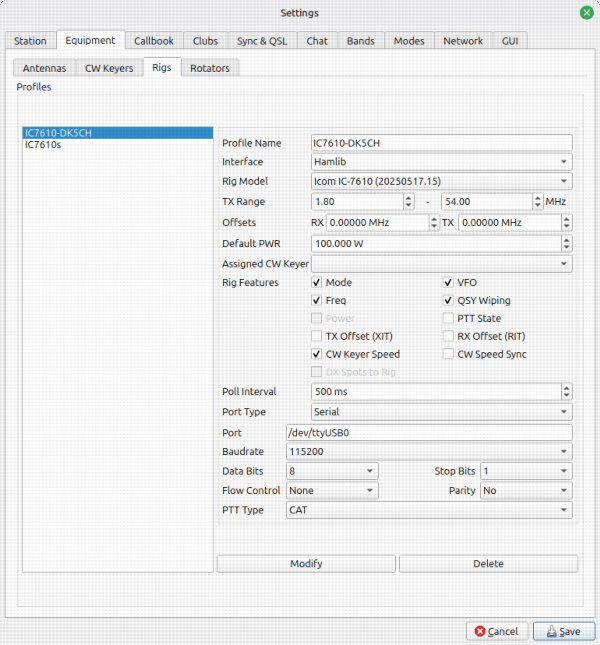
Once that was done, I needed to configure QLog. To do this, you call up a configuration screen (shown in the screen shot below) by clicking File -> Settings -> Equipment -> Rigs and  add a rig. One of the nice things about QLog is that you can have a number of these configurations and switch between them if you use more than one rig.

Try as I might, though, I couldn’t get QLog to talk to the radio. So, I turned to IC-7610 mailing list. I got several nice replies, including one from Chris, DK5CH. He sent me the details of his configuration of both QLog and the IC-7610, but that failed to get them talking. I surmised that perhaps I needed a driver from Icom, or that maybe I needed to change the CI-V configuration of the IC-7610. He sent his IC-7610 CI-V configuration, but that didn’t work, either.

Another thing that Chris mentioned is the user running the program has to be a member of the “dialout” group. I figured out how to add myself to the dialout group, but still no joy.

Of course, it turned out to be something simple. In one of his emails, Chris, wrote, almost as an afterthought:

As you can configure multiple radios in QLog, you have to first choose the radio, then click on Equipment -> Connect Radio. This isn’t required by other logging software.

Once, I did that it worked like a charm! Thanks, Chris!

One of the reasons all this was so frustrating is that I don’t see this step in the documentation at all. Incomplete documentation is a problem with many open-source projects like this. Once I’m happy with QLog, I plan to take a look at the project wiki and see if I can’t improve the docs.

Other things I needed—and still need—to do

While getting QLog to talk to my radio was the most time-consuming, there were a couple of other things I needed to do to get it working the way I wanted. One of them was to import the ADIF file from my from the Windows computer. The snag here was that I created a special field for the city in my N3FJP log, and that field didn’t import into QLog.

QLog does have a QTH field, though. So, what I did was to use vim to substitute “QTH:” for “City:” in the ADIF file. That worked great, even though the ADIF file was nearly 18 megabytes. Most text editors don’t like files that large.

Next, I wanted to add the State field to the QSO table and the QSO input screen. Adding it to the table was easy enough. Right-clicking on any of the fields in the table brings up a screen with all of the available field types. Checking the State box added that field to the table.

Adding it to the QSO input area was a little less intuitive. QLog has kind of a weird way of doing this. First of all, I had to create a configuration type for the configuration I wanted and then edit that configuration. Once I’d done that, to move the Table field out of the Details area and then back into the QSO input area, where I wanted it. Again, this wasn’t really explained at all in the documentation.

Finally, I need to configure QLOG to submit contacts to Logbook of the World. I don’t anticipate that to be a big chore, but you never know. :)

Having said all this, I do like QLog. I have it pretty much configured the way I had the N3FJP ACLog configured, and it’s working pretty much the same way. With some improvements to the documentation, this could be a really nice logging program.

After QLog, what’s next? I’ll probably install:

  • Not1MM for contesting.
  • WSJT-X. I still want to try meteor scatter one of these days.
  • fldigi
  • Some kind of SDR package. A couple of months ago, Linux in the Ham Shack had an episode on SDR++ Brown, and I’ve been meaning to try that.
  • GNU Radio, if I get ambitious.

Filed Under: Computers, Software Tagged With: Linux, QLog

Videos I’ve been watching: HF propagation, how to use a NanoVNA, Hallicrafters’ world of SW radio

September 1, 2024 By Dan KB6NU Leave a Comment

W3LPL on HF propagation

At an hour and a half, this video is kind of long, but if you’re interested in propagation, it’s worth watching.

W2AEW on how to use a NanoVNA to measure a filter’s characteristics

Alan, W2AEW, shows how to use a NanoVNA, which is one of the most useful tools for characterizing RF components and circuits.

Hallicrafters World of SW Radio

Back in the day, Hallicrafters was arguably the biggest name in amateur and shortwave radio. Unfortunately, this is just an audio file, but I guess, radio is audio so just close your eyes and imagine that you’re listening to this on a Hallicrafters receiver.

Filed Under: Computers, Propagation, Software, Test Equipment Tagged With: Grace Hopper, nanoVNA

Recent adventures with Linux

November 29, 2023 By Dan KB6NU 5 Comments

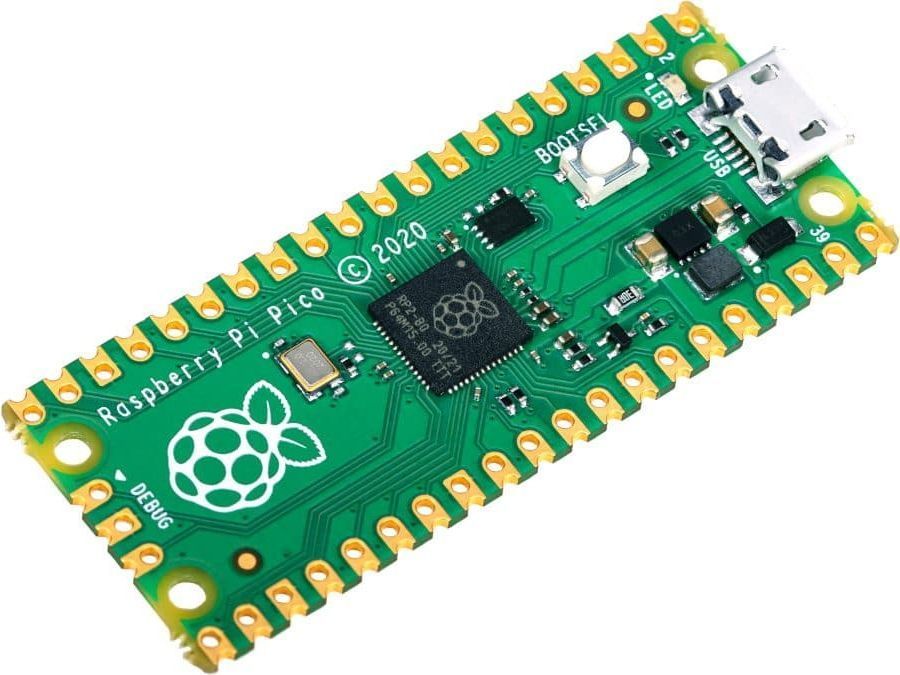
While plowing through a stack of old QSTs the other day, I ran across the article, “A Simple Morse Memory Keyer,” by Dave Benson, K1SWL. K1SWL’s design uses a Raspberry Pi Pico, which is a small, inexpensive, yet quite powerful, microcontroller board. Since I had one that I purchased to play around with a while ago, I thought I’d give this project a go.

The software was devloped in BASIC, using the MMBASIC interpreter, but I thought I’d use this project to learn more about Python. You can program the Pico with MicroPython, if you have the right tools. One of those tools is Thonny, an integrated development environment (IDE). There are versions that run on Windows, Macs, and Linux boxes.

I have an old laptop that I installed Lubuntu on a while back, so I thought I’d use that for programming. Unfortunately, I couldn’t seem to install the latest version of Thonny on it. I’m not sure exactly why, but I thought that perhaps something was weird with my Lubuntu installation.

So, I decided to install another ham radio distro. The first one I tried was Andy’s Ham Radio Linux, created by Andy, KB1OIQ. It had gotten a nice write-up on Hack-a-Day, and it looked like just what I needed.

Unfortunately, I never got it to install properly. The first couple of attempts were my fault. My first mistake, I think, was trying to use the Lubuntu Startup Disk Creator. I probably should have gone with one of the tools that KB1OIQ recommends, or the program that I eventually used—Balena Etcher. Plus, I really disliked the Lubuntu default wallpaper!

My next mistake was not reading the Getting Started document. In that document, KB1OIQ details the steps to follow to successfully install his distro. I just plugged the USB stick into the laptop and winged it. Using this approach, I ended up making several mistakes.

Dragon OS

Even following the instructions, though, I was never able to install the software correctly. After four attempts, I just gave up and went to Plan B: Dragon OS.

Dragon OS is based on Lubuntu (ironically) and includes a bunch of SDR software.  You can see the complete list on the DragonOS Sourceforge page. It  supports a wide range of inexpensive SDR hardware, including RTL-SDR, HackRF One, LimeSDR, BladeRF, and many others.

Installing this distro was a breeze. I downloaded the .iso file, burned the installation disk with Balena Etcher, plugged it in, and it installed the very first time. Thonny wasn’t part of the distro, but I opened a terminal window, typed in “pip install thonny”, and in a couple of minutes, I had the latest and great version of the IDE. It took me two days, but I can finally start working on the keyer software now.

So, now, I have some questions for you:

  1. Are you using Linux in your ham station?
  2. If so, what distribution?
  3. What do you like or dislike about it?
  4. What are some fun Linux software packages, other than Thonny, that I can play with?

Filed Under: Computers, Software Tagged With: Dragon OS, Linux, Raspberry Pi Pico

Random thoughts and ideas: If I’d only…, embedded Python programming, get a free email.radio email address

November 8, 2023 By Dan KB6NU 5 Comments

If I’d only kept my butt in the chair a little longer…

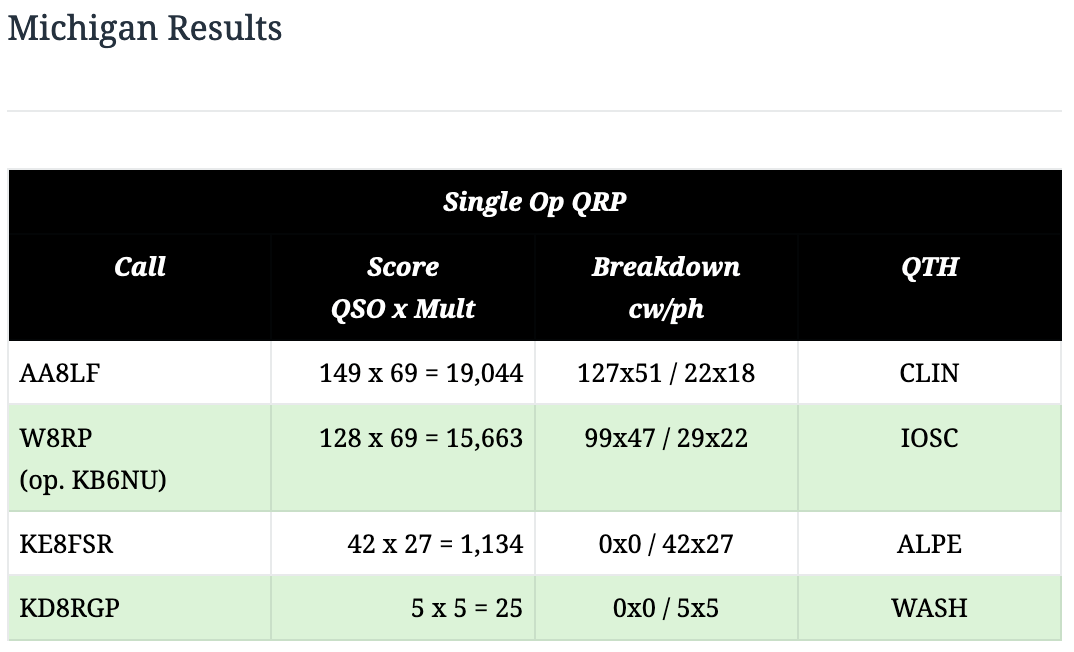
…I might have come in first in the QRP category for the 2023 Michigan QSO Party. I only operated for 7-1/2 hours, not all 12 hours.

Embedded Python programming resources

Python programming is popular for AI, web, and amateur radio applications, and it can also be used for embedded applications. Here’s a list of articles from electronic design on programming in Python:
  • The Best Python Compilers and Interpreters for Developers
    Oct. 24, 2023
    The Python programming language and its applications can be supercharged by these leading compilers and interpreters.
  • What’s the Difference Between Python and MicroPython?
    April 17, 2023
    The differences between the Python and MicroPython programming languages are minute, but they make a powerful difference.
  • How to Program Hardware with MicroPython: A Beginner’s Guide
    June 4, 2020
    C isn’t the only programming language for microcontrollers. This article covers the compatible hardware and workflow steps when programming with a different option—MicroPython…
  • An Introduction to MicroPython and Microcontrollers
    May 14, 2020
    Microcontrollers don’t have to be programmed in C. MicroPython works just fine.
  • Python’s Big Push into the Embedded Space
    Aug. 29, 2018
    Python is very popular in many areas from machine learning to powering websites, but it’s also great for embedded applications.

Get a free email address from email.radio

The email.radio website says,

email.radio is dedicated to providing free email hosting for all licensed ham radio operators (globally). You will get a (free!) email @email.radio address, that is 1GB, which you can ask to expand later on.

Unlike the ARRL forwarding service this appears to be a real email account. I’ve just applied for an address, and I’ll post here with my experience once I’ve got it.

Filed Under: Building/Homebrew, Computers, Contests, Microcontrollers Tagged With: email, MI QSO Party, Python

An exhausting few days in Las Vegas

August 13, 2023 By Dan KB6NU 1 Comment

I just returned from Las Vegas yesterday, where I attended DEFCON and taught a one-day Tech class in the Ham Radio Village for the second year in a row. As it was last year, it was both exhilarating and exhausting. I arrived Wednesday afternoon, taught the class on Thursday, wandered about DEFCON on Friday, learned a few things, and left Saturday morning.

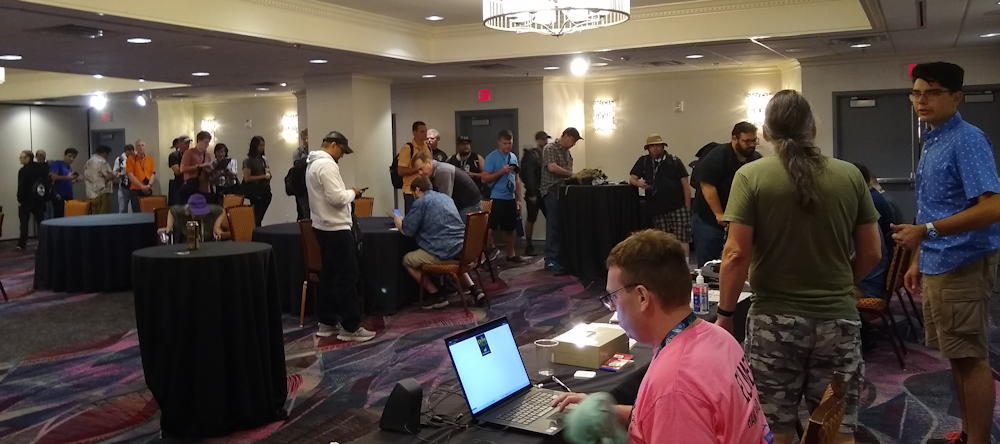
Students line up to register for the exam after my 2023 DEFCON one-day Tech class.

This year, there was another full house (pun intended) with 31 students in all. Unfortunately, only 24 passed the test. That’s a little lower than my usual pass rate, but come to find out that some of the students had never even looked at the study guide before the class. I know this because when I mentioned that I was following my study guide from front to back, several asked where they could get it.

I’m already thinking about next year. For example, I think with a little more publicity we could get 50 people to attend the class. Also, I probably should make up some slides to make up to show the students what resistors look like and what RF connectors look like. I usually have a goodie bag of components that I pass around for a local class, but it’s difficult to do that for a class somewhere other than Ann Arbor.

At lunch, an ICQPodcast listener joined me for lunch. That was nice. I told him that I was always surprised when people say they listen to us on the podcast. He replied that he was a relatively new ham, and that listening to the podcast helped him learn more about the community and become part of it. I hadn’t thought about that being one of our functions, but it’s something that I’m going to keep in mind on future episodes.

After the class, two study guide readers came up to me and thanked me for writing the study guides. One of them said that he used my study guides to pass all three tests. Now, he’s a VE with Ham Radio Village and giving back as well. How cool is that?

Hanging out at DEFCON

On Friday, I hung out at the conference and learned stuff. I learned a bit about quantum computing, how some people are using social media to chart the course of the war in Ukraine, and whether or not solid-state drives are actually more reliable than mechanical hard drives.

One of the other “villages” that I was really impressed with was the Hardware Hacking/Soldering Skills Village. They had at least a hundred people sitting at tables soldering and unsoldering things. Hamvention needs something like that.

While I’ll teach at DEFCON for as long as they’ll have me, I have never been a big fan of Las Vegas. I really have no desire at all to gamble anymore (I used to play a little blackjack), it’s incredibly hot in August (every day was over 100ºF), and the price for nearly everything is sky-high (I paid more than $20 for breakfast at a Dunkin Donuts!). Even so, it was packed to the gills. I was amazed that they get so many people there with such high temperatures and high prices.

Despite all that, DEFCON did get me pumped up about doing more hacking. For example, I’m going to look into purchasing a Xiegu X6100 and hacking on it. Apparently, the software runs on an internal Linux computer and can be user-modified. R1CBU has already hacked the X6100, adding features and improving the radio’s performance. I’m looking forward to learning more about this. I also have some other ideas, which I’ll be writing more about in the future.

UPDATE 8/15/23

I got this very nice email today:

Hi Dan,

Thank you for teaching your class @ DefCon! I was lucky enough to snag a spot at the very last minute; I got a lot out of the class but, since I had no prior knowledge of/experience with the subject and the exam was being offering for the duration of the con, I decided to hold off until I’d had a chance to review the material.

That said, I’m happy to share that I took & passed the exam on Sunday after re-reading your guide and taking a practice test.

So, thank you again for piquing my interest in ham radio & making it so accessible — I hadn’t expected to leave Las Vegas a licensed amateur radio technician!

I’ve since downloaded your “21 Things to do After” guide and look forward to getting started with my first radio.. : )

How cool is that? That bumps up my pass rate a little more  :)

Filed Under: Computers, Gear/Gadgets, Software-Defined Radio (SDR) Tagged With: DEFCON, hacking, Las Vegas

ICQ Podcast Episode 365 – The Right Tool for the Job

December 6, 2021 By Dan KB6NU Leave a Comment

In this episode, I joined Colin Butler, M6BOY; Martin Butler, M1MRB; and Ed Durrant, DD5LP to discuss the latest amateur radio news. We discussed:

  • Using an Arduino to Upgrade a 1970s Ham Radio

  • New Law Hits AIS Beacons

  • 10-year-old Radio Ham Launches his 3rd High-Altitude APRS Balloon

  • US Virgin Island Amateur Radio Group Bolsters Repeater Infrastructure

  • Indonesian Radio hams sign MoU with Defense University

  • Norway Introduce Programs to get Kids into Ham Radio

  • Spain Seeks to Attract Youngsters to Amateur Radio

This episode’s feature is “The Right Tool for the Job.”

Filed Under: Computers, Emergency Communications / Public Service, Kids Tagged With: Arduino, Indonesia, Norway, Spain, Virgin Islands

Golden anniversary of the microprocessor

November 15, 2021 By Dan KB6NU 4 Comments

I used to marvel at the changes that occurred during the lifetime of my grandparents. Born in the early 1900s, they saw the rise of the automobile, the invention of radio and television, and our first attempts at computers.

Now, at the age of 66, I’m beginning to marvel at the changes that have occurred during my lifetime. For example, we’ve now reached the 50th anniversary of the microprocessor.

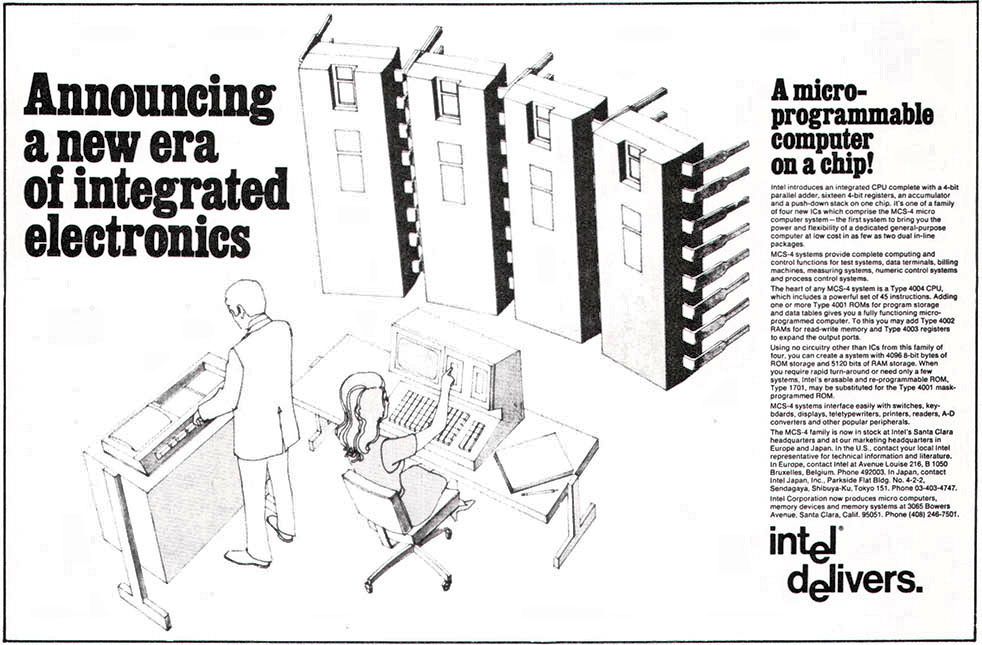
The ad above announces the 4004, 4-bit microprocessor and the 4001 256×8 mask-programmable Read-Only Memory (ROM), the 4002 320-bit Random Access Memory (RAM), and 4003 10-bit shift register. In all, Intel is touting this series of ICs as “a new era of integrated electronics.”

And, indeed, it was. Before this, companies built computers from small-scale integration (SSI) and medium-scale integration (MSI) integrated circuits. Quite often, these were transistor-transistor logic (TTL) chips.

Just to see how far we’ve come, consider that the Intel 4004 had 2,300 transistors. Apple’s new M1 Max processor has more than 57 billion (yes, billion) transistors! This is all just so incredible to me—and I have a degree in electrical engineering.

For more information on the history of the 4004 microprocessor, see Say Happy 50th Birthday to the Microprocessor, Part I by Steven Leibson in Electronic Engineering Journal.

For a second take on the history of the 4004, see Intel 4004 Microprocessor : The first CPU-on-a-chip was a shoestring crash project.

Filed Under: Computers Tagged With: 4004, Intel, microprocessors

  • Page 1
  • Page 2
  • Page 3
  • Interim pages omitted …
  • Page 7
  • Go to Next Page »

Primary Sidebar

No Nonsense Technician Class License Study Guide (for tests given between July 2026 and June 2030)

New No Nonsense Technican Class Study Guide now available!

The 2026 version of my Tech Class study guide is now available, and as always, the PDF version is FREE!. The ePub version costs $11.97, and a Kindle version and paperback version will be available on Amazon shortly.

Click here to get all of my "No Nonsense" study guides.

Also available: The CW Geek's Guide to Having Fun with Morse Code

W5SWL.Com
Retevis Ailunce H1 DMR Radio
DXpander: Cobweb antennas, Laser Cutting

You’ve got mail!

Enter your email address below and get an email every time I publish a new post.

Email


I frequently teach classes to help newcomers get their licenses. The next class will take place on Saturday, February 7, 2026 on the University of Michigan campus. Click here for more information.

If you can't make the class, subscribe to the mailing list to be notified of when the next class will be held.

You can always download my free study guide, and if you have any questions about the classes, or amateur radio in general, please feel free to email me directly.

Support KB6NU.Com

Donate $7.30 and get two of these cool stickers. Measuring 4.25-in. W by 2.75-in. H, it's perfect for your car, your shack, or wherever!

Contact me

If you have a question or comment about one of my blog posts, or a question about any of the material in my study guides, or just a question about ham radio in general, you can email me at [email protected].

Blogs You Should Also Read

  • AE5X: A CW-centric blog from Kingswood, Texas
  • K0LWC Blog
  • LA3ZA Ham Radio Blog
  • Little Radios, Big Fun – WB3GCK
  • Mr. Vacuum Tube's Blog
  • Radio Artisan – K3NG
  • The K0NR Weblog
  • VE3WDM's QRP Ham Radio Blog
  • W2LJ’s Blog

Ham Radio Websites

  • Dashtoons – The Hammin' Comedy by Jeff K1NSS

Podcasts

  • ICQ Podcast
  • Linux in the Ham Schack
  • No Nonsense Amateur Radio Podcast
  • Resonant Frequency Amateur Radio Podcast

Recent Comments

  • Dan KB6NU on Finally, a Loop for 10m.
  • Dan KB6NU on 1930s cards for my collection of QSLs from stations whose callsigns spell words
  • Sean on Finally, a Loop for 10m.
  • Bill Waslo on 1930s cards for my collection of QSLs from stations whose callsigns spell words
  • C M Wetzel KD8TNF on The Wesco BN-1

Meta

  • Log in
  • Entries feed
  • Comments feed
  • WordPress.org

Footer

Copyright © 2026 Daniel M. Romanchik, KB6NU · Log in