• Skip to primary navigation
  • Skip to main content
  • Skip to primary sidebar
  • Skip to footer

KB6NU's Ham Radio Blog

KB6NU's Ham Radio Blog
  • HOME
  • Study Guides
  • Teach a One-Day Tech Class
  • W8SRC Repeater Guide
  • Advertise
  • Hire Me

Microcontrollers

Random thoughts and ideas: If I’d only…, embedded Python programming, get a free email.radio email address

November 8, 2023 By Dan KB6NU 5 Comments

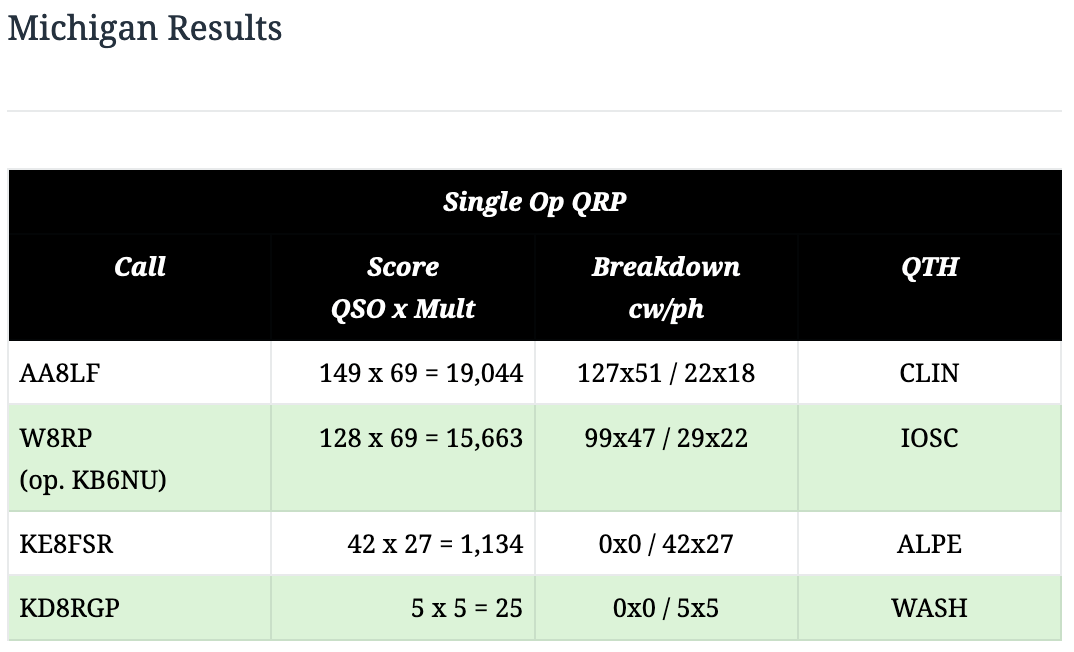
If I’d only kept my butt in the chair a little longer…

…I might have come in first in the QRP category for the 2023 Michigan QSO Party. I only operated for 7-1/2 hours, not all 12 hours.
Embedded Python programming resources

Python programming is popular for AI, web, and amateur radio applications, and it can also be used for embedded applications. Here’s a list of articles from electronic design on programming in Python:
  • The Best Python Compilers and Interpreters for Developers
    Oct. 24, 2023
    The Python programming language and its applications can be supercharged by these leading compilers and interpreters.
  • What’s the Difference Between Python and MicroPython?
    April 17, 2023
    The differences between the Python and MicroPython programming languages are minute, but they make a powerful difference.
  • How to Program Hardware with MicroPython: A Beginner’s Guide
    June 4, 2020
    C isn’t the only programming language for microcontrollers. This article covers the compatible hardware and workflow steps when programming with a different option—MicroPython…
  • An Introduction to MicroPython and Microcontrollers
    May 14, 2020
    Microcontrollers don’t have to be programmed in C. MicroPython works just fine.
  • Python’s Big Push into the Embedded Space
    Aug. 29, 2018
    Python is very popular in many areas from machine learning to powering websites, but it’s also great for embedded applications.

Get a free email address from email.radio

The email.radio website says,

email.radio is dedicated to providing free email hosting for all licensed ham radio operators (globally). You will get a (free!) email @email.radio address, that is 1GB, which you can ask to expand later on.

Unlike the ARRL forwarding service this appears to be a real email account. I’ve just applied for an address, and I’ll post here with my experience once I’ve got it.

Filed Under: Building/Homebrew, Computers, Contests, Microcontrollers Tagged With: email, MI QSO Party, Python

Three from Twitter: OCF dipole covers 40-6 meters, generate your own azimuthal map, build an all-band receiver with an Arduino

July 4, 2021 By Dan KB6NU 37 Comments

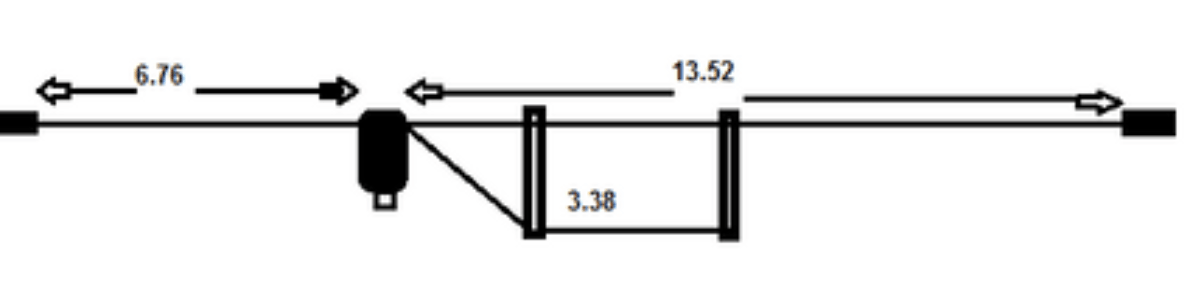
OCF dipole covers 40 – 6 meters

Dimensions are in meters. The balun at the feedpoint is a 4:1 balun.

I don’t usually plug products here, but I thought that this M0CVO off-center fed dipole was a clever design. Not only that, it can be easily built by the homebrewer. According to M0CVO,

The HW-42HP is an Off Centre Fed Dipole with a difference.  Designed to operate on all bands from 40m (7MHz) – 6m (50MHz).  It will operate on 40, 30, 20, 17, 15, 12 and 10m without an ATU (SWR <3) plus 6m with an ATU.  It is also possible to operate on both 80m (3.5MHz) and 60m (5MHz) via a good ATU.  This will handle 400W key down or 500W PEP.

Having a feedpoint 1/3 of the way along gives a feedpoint impedance of 200ohms.  This is not ideal for modern day transceivers requiring an antenna with a 50ohm impedance.  Therefore, a 4:1 balun is added at the feedpoint to alter the impedance to something closer to the 50ohms required.  This then allows the antenna to be fed using standard 50ohm coaxial cable such as RG8 or RG213.

The overall length of the antenna is 20.28m or 66ft.  It may be mounted horizontally, as a sloper or as an inverted vee.  If space is at a premium it may also be ‘bent’ to fit in with no loss in performance.

Generate your own azimuthal map

NS6T has made available an online azimuthal map generator, and it’s very cool. Here’s an azimuthal map centered on my location in Ann Arbor, MI.

To generate a map, all you have to do is to input your grid square or latitude and longitude, but wait, there’s more! You can also specify a distance from your location to get a smaller map, and have it include grid squares.

Build an all-band receiver with an Arduino (and an Si4735)


Here’s an interesting project that looks relatively simple to build. It uses an Arduino to control an Si4735, which is a fully-integrated, 100% CMOS AM/FM/SW/LW radio receiver on a chip. DigiKey has them for $18. You could probably build a complete receiver for less than $50.

This video shows some enhancements that Mirko has added to the software, but there are links to oprevious videos describing the original project.

Filed Under: Antennas, Building/Homebrew, DX, Microcontrollers, Receivers Tagged With: Arduino, azimuthal map, OCF dipole

CW-ELMER: a fun tool for analyzing your fist

January 31, 2021 By Dan KB6NU 12 Comments

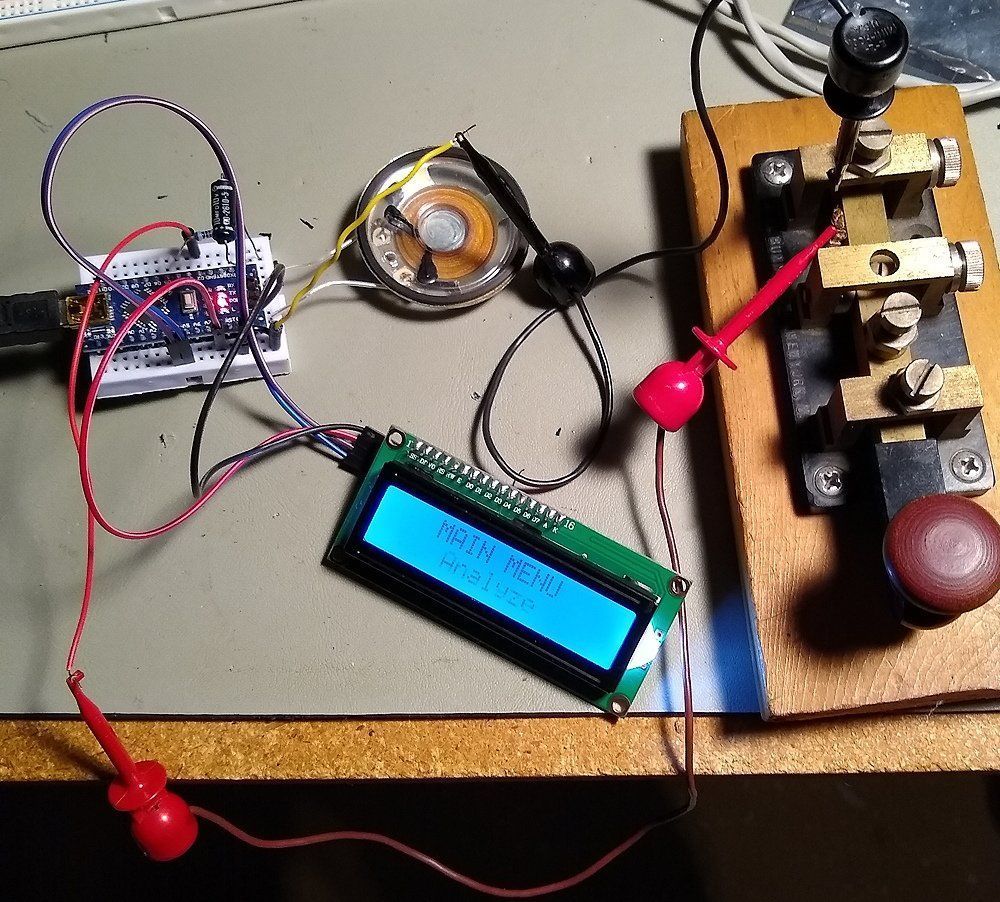
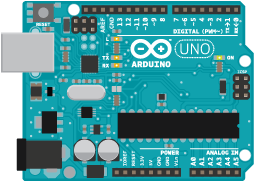
As I’ve written in the past, my friend Paul, KW1L, is a real CW technician. So, when I saw the article, “CW-ELMER Advanced Morse Code Learning System” in the January 2021 QST, I knew he’d be interested in it. And, since all it takes to build it is an Arduino, a speaker and a 16×2 LCD display, I already had all the parts.

Or, so I thought. As it turns out, the display specified in the article uses a serial interface and my 16×2 display has an I2C interface. A quick email to the author, David K7DUN, not only yielded some advice, but an updated version of the software. I connected up all the components as shown in the figure below, and the thing began to play.

This little device has a couple of interesting features that I’ve not seen before. Its ANALYZE function, for example, measures the lengths of the dits and dahs that you send and then calculates the average length and compares that to a target value. It also gives you the max and min lengths of the dits and dahs of the text you sent.

If your sending is way off, you can go to the EXERCISES section and practice just dits and dahs. As you send these elements, the LCD displays the length of the dit or dah that you just sent and the target value. There are also exercises for intra-character pause, character pause, and word pause.

I haven’t tried connecting a keyer to the thing yet, but it could be useful when used with a keyer, too. Using this, you should be able to determine how consistent the dits and dahs that your keyer sends really are and get an indication of how consistent your character pauses and word pauses are. (Paul often chides me that I sometimes crowd my characters.)

All in all, this is a fun little project for those who want to really perfect their sending. If you do decided to build one, be sure to email K7DUN and get the latest version of the software. I’ll publish a little more about how this thing works after Paul has played with it for a while.

Filed Under: CW, Microcontrollers

Open browser windows: Characterize a low-pass filter with a scope and signal generator, Hackspace magazine, shortcomings of virtual communications

October 27, 2019 By Dan KB6NU Leave a Comment

I haven’t tried this yet, but it looks like a good way to characterize a filter without a spectrum analyzer.


HackSpace is a magazine that looks to be directed at Raspberry Pi users, but hams use Raspberry Pis, don’t we? In issue #24, there are at least two articles that I found interesting:

  • Making and tuning antennas: Sending and receiving data the most efficient way.
  • Get FM radio on a microntroller: Link your Arduino up to the airwaves and get some banging tunes.

Neither article is amateur radio specific, but the concepts could easily be adapted to amateur radio.


The Many Shortcomings of Virtual Communication. I’m thinking of starting a webinar-like amateur radio class and using Zoom so that students from around the country can attend. That’s what made this article of interest to me.

It’s a short book review of the new book Can You Hear Me? How to Connect with People in a Virtual World. Even though it’s a book review, it does have a tip or two on how to make virtual communication more effective. One of them is t ask the attendees how they’re doing before beginning the webinar. The helps make a personal connection and engages the attendees at least a little bit, which hopefully leads to keeping them engaged and interested throughout the webinar.

More about the virtual ham radio classes in an upcoming blog post.

Filed Under: Gear/Gadgets, Microcontrollers, Test Equipment Tagged With: oscilloscope, RPi, sig gen

My first Arduino class a success

December 2, 2018 By Dan KB6NU 3 Comments

I held my first Arduino class yesterday at All Hands Active (AHA!), a makerspace here in Ann Arbor.I had six students, including a father and his daughter, a high school student, and three other adults.

To teach the class, I used an earlier version of the Sparkfun Inventor’s Kit Guide, even though we didn’t use the Inventor’s Kit in the class. Because the Arduino kits that we did use didn’t have all of the sensors and actuators in the Sparkfun Inventors Kit, we could only do some of the experiments. The experiments that I chose included:

  • Blinking an LED
  • Potentiometer
  • Push Buttons
  • Photo Resistor
  • Buzzer

I would have also liked to do an experiment with a temperature sensor and a motor or servo, but those components weren’t included in the kits that I had. On the other hand, these five experiments took up more than the two hours that I had allotted for the teaching part of the class. So, it worked out OK.

I got the starter kits—the Elegoo EL-KIT-004 UNO Project Basic Starter Kit with Tutorial and UNO R3 for Arduino—from Amazon. My thinking is that it would be inexpensive for students to purchase and had enough “stuff” to get the students started.

Unfortunately, it didn’t really have quite enough “stuff.” It was, for example, missing a potentiometer. So, to supplement the kit, I made up a couple of pots with wires that they could plug into the breadboard. It would also have been nice to have a temperature sensor and a motor or servo, so that the students got a better idea of what you could do with an Arduino.

I also wasn’t thrilled with the quality of the breadboard in the kit. One of the students had a problem getting one of the experiments to work, and as it turned out, it was because one of the wires connecting the components wasn’t making good contact with the breadboard. It just had a cheap feel to it.

I’m thinking that next time I’ll go with something like the Keywish UNO Project Starter Kit for Arduino with UNO R3 Development Board, LCD1602, Breadboard, Servo Motor, Detailed Tutorial. It costs only a few dollars more and includes pots, a servo motor, and even an LCD display. It doesn’t have a temperature sensor, though.

Keeping the students on their toes

Partly to make up for the lack of a temperature sensor and other components, I improvised. The push button experiment called for the students to connect two momentary-contact switches to two digital inputs and an LED to a digital output. To turn on the LED, you pressed and held down one of the switches. Pressing the second, while holding down the first, turned the LED off.

That functionality seemed kind of useless to me, so I challenged the students to modify the program so that pressing one of the switches would turn the LED on and remain on, even if the switch was released. To turn the LED off, you had to press the second switch.

One of the students. Laria, had a solution in minutes. It took the others a little while longer, but after I shared Laria’s solution with them, they all had their versions working soon after. It was a fun exercise and got them thinking “outside the book.”

When all was said and done, I think we all had fun and learned something about Arduinos. The students learned how to do both digital and analog output and  input and got a good sense of what the Arduino can do. I also learned a thing or two about teaching Arduino classes. I plan to have another go at this in three months or so.

Filed Under: Classes/Testing/Licensing, Microcontrollers Tagged With: Arduino

From my Twitter feed: WSPR antenna testing, 3D Smith Chart, SW activity monitor

July 10, 2017 By Dan KB6NU 1 Comment

OH8STN's avatar

@OH8STN

WSPR Antenna Testing Methodology oh8stn.org/blog/2017/06/2…

Media preview

MicrowavesRF's avatar

@MicrowavesRF

The Smith Chart Enters a New Dimension bit.ly/2uRUqng

Media preview


hackaday's avatar

@hackaday
 Radio project on #Hackadayio detects activity on shortwave channels using #RaspberryPi. bit.ly/22zgob5
Media preview

Filed Under: Antennas, Digital Modes, Gear/Gadgets, Microcontrollers, Software-Defined Radio, SWLing Tagged With: Smith Chart, SWL, WSPR

From my Twitter feed: satellites, MW/LW receive antenna, how rotary encoders work

January 5, 2017 By Dan KB6NU Leave a Comment

There were lots of good things in my Twitter feed this morning. Here are the three coolest.

AmsatUK's avatarAMSAT-UK @AmsatUK
Having Fun with #AmateurRadio Satellites by VK4ZQ vk4zq.wordpress.com/2016/09/24/hav…#amsat#hamradio#hamr

This item got my attention because I finally got around to reading the AMSAT Journal that I picked up at Dayton last year. In that issue, there was a short article by Carlos, CX6BT, who, while on vacation set up his HT to scan the 2m band and inadvertently picked up AO-85.  This got me thinking that I should be able to do the same thing. So, I’m going to reprogram one of my HTs to simply scan for satellites.


Mark Taylor @ma_taylor4
An interesting RX antenna for medium wave. bit.ly/2hUtzzW

When I was a kid, I built a similar antenna to do AM BCB DXing. I think I got the plans from a National Radio Club newsletter or maybe a Popular Electronics. Mine was a larger loop, but with fewer turns wound on a wooden frame. My woodworking skills were pretty bad (they still are!), so it looked pretty crude, but it worked pretty well.


HackerSpaceTech's avatarHackerSpace Tech @HackerSpaceTech
How Rotary Encoder Works and How To Use It with Arduino #HackerSpaceTech #arduino #tutorials vid.staged.com/dZAt

Filed Under: Antennas, Electronic components, Microcontrollers, Satellites, SWLing

From my Twitter feed: RF from RPi, ARRL to review OO program, free propagation book,

March 30, 2016 By Dan KB6NU Leave a Comment

hackaday's avatar hackaday @hackaday

Tiny Raspberry Pi Shield for High-Quality RF Signals wp.me/pk3lN-OD1


arrl's avatar ARRL @arrl

ARRL to Review, Evaluate, and Explore Possible Improvements for OO Program: The ARRL Executive Committee has d… bit.ly/22IEdfB


Spy_Stations's avatar Numbers-Stations.com @Spy_Stations

Understanding LF and HF Propagation ebook g0kya.blogspot.com/2010/11/unders…\


ThrillScience's avatar Thrill Science ® @ThrillScience

1980s documentary about the future of Personal Computing youtube.com/watch?v=F4jr1I… @FozzTexx

Filed Under: ARRL, Microcontrollers, Propagation, Software-Defined Radio Tagged With: Official Observers, personal computing, RaspberryPi

From my Twitter feed: Pi2 SDR, Pi radio astronomy, Cubic SDR

February 15, 2016 By Dan KB6NU Leave a Comment

ke9v's avatarJeff Davis @ke9v
SkyPi is a modern software defined radio transmitter kit for the Raspberry Pi that covers 40 meters. radwav.com/index.html

ChristianEA4's avatarChris – EA4UC @ChristianEA4
Radio Astronomy with an RTL-SDR, Raspberry PI and Amazon AWS IoT rtl-sdr.com/radio-astronom…

JohnSeney's avatarJohn Seney @JohnSeney
CubicSDR | Cross-Platform and Open-Source Software Defined Radio Application #hamr buff.ly/1U2Tu8l pic.twitter.com/H2AXuQBkJl

Filed Under: Microcontrollers, Software-Defined Radio (SDR) Tagged With: Cubic SDR, Raspberry Pi

Amateur radio videos: NPOTA, reuse an LCD display

February 2, 2016 By Dan KB6NU 1 Comment


Mike Wendland, of the “PCMike” tech segment on NBC-TV and the roadtreking.com website and podcast, sets up a radio station on the North Country Scenic Trail in Michigan’s Upper Peninsula as part of the ARRL and National Park Service “National Parks on the Air” event.


Having a second monitor for your PC is really helpful sometimes. In this video the author turns the LCD Screen of a broken laptop into a nice looking second monitor for your PC, gaming console or Raspberry Pi.

Filed Under: Gear/Gadgets, Microcontrollers, Operating Tagged With: LCD, NPOTA

  • Page 1
  • Page 2
  • Go to Next Page »

Primary Sidebar

No Nonsense Technician Class License Study Guide (for tests given between July 2026 and June 2030)

New No Nonsense Technican Class Study Guide now available!

The 2026 version of my Tech Class study guide is now available, and as always, the PDF version is FREE!. The ePub version costs $11.97, and a Kindle version and paperback version will be available on Amazon shortly.

Click here to get all of my "No Nonsense" study guides.

Also available: The CW Geek's Guide to Having Fun with Morse Code

W5SWL.Com
Retevis Ailunce H1 DMR Radio
DXpander: Cobweb antennas, Laser Cutting

You’ve got mail!

Enter your email address below and get an email every time I publish a new post.

Email


I frequently teach classes to help newcomers get their licenses. The next class will take place on Saturday, October 10, 2026 on the University of Michigan campus. Click here for more information.

If you can't make the class, subscribe to the mailing list to be notified of when the next class will be held.

You can always download my free study guide, and if you have any questions about the classes, or amateur radio in general, please feel free to email me directly.

Support KB6NU.Com

Donate $7.30 and get two of these cool stickers. Measuring 4.25-in. W by 2.75-in. H, it's perfect for your car, your shack, or wherever!

Contact me

If you have a question or comment about one of my blog posts, or a question about any of the material in my study guides, or just a question about ham radio in general, you can email me at [email protected].

Blogs You Should Also Read

  • AE5X: A CW-centric blog from Kingswood, Texas
  • K0LWC Blog
  • LA3ZA Ham Radio Blog
  • Little Radios, Big Fun – WB3GCK
  • Mr. Vacuum Tube's Blog
  • Radio Artisan – K3NG
  • The K0NR Weblog
  • VE3WDM's QRP Ham Radio Blog
  • W2LJ’s Blog

Ham Radio Websites

  • Dashtoons – The Hammin' Comedy by Jeff K1NSS

Podcasts

  • ICQ Podcast
  • Linux in the Ham Schack
  • No Nonsense Amateur Radio Podcast
  • Resonant Frequency Amateur Radio Podcast

Recent Comments

  • Rob WfourZNG on Videos: What’s next for POTA, ham radio helps rescue man trapped in cave
  • Dan KB6NU on The EMF Explorer: A badge for ham radio?
  • Travis Good on The EMF Explorer: A badge for ham radio?
  • MARTIN ROBERT ROTHFIELD on The EMF Explorer: A badge for ham radio?
  • Mike Chen on Operating Notes, January 5, 2026

Meta

  • Log in
  • Entries feed
  • Comments feed
  • WordPress.org

Footer

Copyright © 2026 Daniel M. Romanchik, KB6NU · Log in