• Skip to primary navigation
  • Skip to main content
  • Skip to primary sidebar
  • Skip to footer

KB6NU's Ham Radio Blog

KB6NU's Ham Radio Blog
  • HOME
  • Study Guides
  • Teach a One-Day Tech Class
  • W8SRC Repeater Guide
  • Advertise
  • Hire Me

Arduino

From my reading list: The inner beauty of electronics

January 23, 2023 By Dan KB6NU 1 Comment

Safari, the web browser that I use most often, has a feature called the “reading list.” It’s like a bookmark, but much more temporary. The list is meant to be a parking lot for sites that you want to read, but not read over and over. Once you’ve read it, you’re supposed to delete the site from the list.

Of course, a lot of sites get stuck on the list, so periodically I actually go through it and read some of the sites on the list. Here are three that I think hams will be as interested in as I am.

The Inner Beauty of Basic Electronics

Many components are not only marvels of electronics engineering, but mechanical engineering as well. Open Circuits: The Inner Beauty of Basic Electronics shows us how beautiful electronic components can be. The authors, Windell Oskay and Eric Schlaepfer, have painstaking opened many electronic components and taken some really amazing cross-section photographs. Here’s an example of a 15-turn potentiometer.

Also included in the book are photographs of transistors, integrated circuits, printed circuit boards, and more. Even if you don’t buy the book, taking a look at some of the photograph’s on the book’s web site is well worth it.


RFZero

I found out about this board via a Tweet by one of the designers. The RFzero is a multi-purpose, GPS-controlled Arduino shield that uses a Si5351A clock generator to generate all kinds of RF signals. Designed by designed by Johan, 5Q7J; Bo, OZ2M; Hans, OZ2XH; and Steen, OZ5N, the web page says that it can be used for all kinds of things, such as a beacon (IBP, SPB, CW, FST4, FST4W, FT4, FT8, JS8, JT9, ModeX (JT65, Q65, …), PI4, WSPR, …), stand alone WSPR/FST4W transmitter, signal generator, VFO, QO-100 dual LO, low cost GPSDO, e.g. for 10 MHz, IC-9700 LO, 90 MHz frequency counter, and more. Being Arduino-based, you can, of course, write or modify the software yourself.

It looks like a very cool board. I might even get one myself. The price is 500 DKK, or about $73.


SIGpi: A signal-intelligence-focuese Linux “go kit”

I came across this via a tweet from RTL-SDR.Com. RTL-SDR.Com is one of those websites that you really want to read if you’re doing anything with software-defined radio (SDR).

Joe, NE2Z,  has developed this Linux distribution called SIGpi. SIGpi is an installable Linux distribution for Ubuntu and Raspberry Pi 3/4 that focuses on providing multiple open source SDR programs that can be used for signal intelligence. with emphasis on capabilities in the VHF, UHF, and SHF spectrum. Optionally, you can install HF SDR software, too. For a complete list, see the SIGpi wiki.

SIGpi runs on the following platforms:

  • Raspberry Pi4 4GB RAM or Raspberry Pi 400 with 32GB microSD card running Raspberry Pi OS Full (64-bit)
  • Ubuntu 22.04 LTS on arm64 and amd64

This sounds like something fun to try on my under-utilized RPi4. Now, I just have to find the time for it.


Filed Under: Electronic Components, Microcontrollers, Software-Defined Radio (SDR) Tagged With: Arduino, Raspberry Pi, RFZero, SIGpi

How do we make hamfests more fun?

September 20, 2022 By Dan KB6NU 5 Comments

Hamfest
You can certainly find a lot of junk at a hamfest.

On the amateur radio subreddit, someone complained about the amount of junk that one finds at a hamfest. I can’t seem to find the exact post right now, but the gist of it was that if you expect people to show up at hamfests, then there has to be something more than just junk for them to buy.  The fellow opined that it wasn’t any fun going to hamfests and coming back empty-handed because all he could find for sale was junk.

I can’t say that I don’t sympathize with that argument. I realize that one ham’s junk is another man’s treasure, but the volume of junk at hamfests does seem to be increasing, and I’ve gone to many hamfests and returned disappointed that I didn’t find anything worth buying.

I’ve thought for quite a while that it might be possible to make a few bucks by selling microcontrollers, like Arduinos and Raspberry Pi Picos. Of course, I’d also have to sell related boards, such as audio boards, relay boards, etc.

I may just give this a go. Even if I don’t make much money doing this, perhaps it will spur others to start playing around with these things, and ultimately, have more fun with amateur radio.

What do you think? Is there a market for microcontroller stuff at hamfests? What would I need to do to be successful? What could other vendors sell that would make hamfests more fun?

Filed Under: Hamfests, Microcontrollers Tagged With: Arduino, Raspberry Pi Pico

ICQ Podcast Episode 365 – The Right Tool for the Job

December 6, 2021 By Dan KB6NU Leave a Comment

In this episode, I joined Colin Butler, M6BOY; Martin Butler, M1MRB; and Ed Durrant, DD5LP to discuss the latest amateur radio news. We discussed:

  • Using an Arduino to Upgrade a 1970s Ham Radio

  • New Law Hits AIS Beacons

  • 10-year-old Radio Ham Launches his 3rd High-Altitude APRS Balloon

  • US Virgin Island Amateur Radio Group Bolsters Repeater Infrastructure

  • Indonesian Radio hams sign MoU with Defense University

  • Norway Introduce Programs to get Kids into Ham Radio

  • Spain Seeks to Attract Youngsters to Amateur Radio

This episode’s feature is “The Right Tool for the Job.”

Filed Under: Computers, Emergency Communications / Public Service, Kids Tagged With: Arduino, Indonesia, Norway, Spain, Virgin Islands

Three from Twitter: OCF dipole covers 40-6 meters, generate your own azimuthal map, build an all-band receiver with an Arduino

July 4, 2021 By Dan KB6NU Leave a Comment

OCF dipole covers 40 – 6 meters

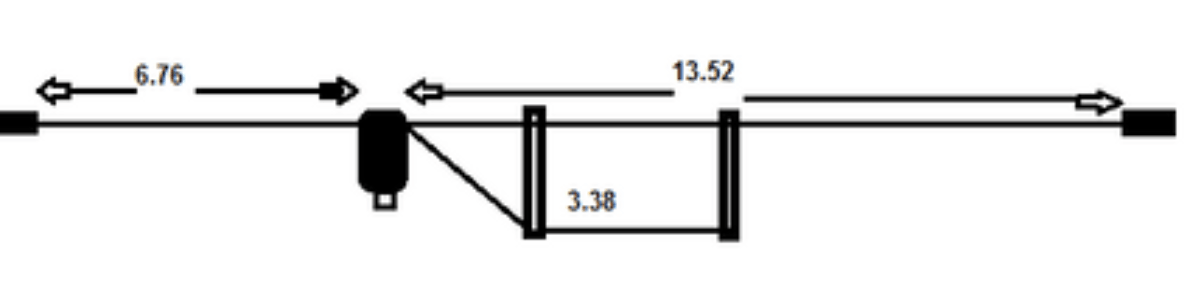
Dimensions are in meters. The balun at the feedpoint is a 4:1 balun.

I don’t usually plug products here, but I thought that this M0CVO off-center fed dipole was a clever design. Not only that, it can be easily built by the homebrewer. According to M0CVO,

The HW-42HP is an Off Centre Fed Dipole with a difference.  Designed to operate on all bands from 40m (7MHz) – 6m (50MHz).  It will operate on 40, 30, 20, 17, 15, 12 and 10m without an ATU (SWR <3) plus 6m with an ATU.  It is also possible to operate on both 80m (3.5MHz) and 60m (5MHz) via a good ATU.  This will handle 400W key down or 500W PEP.

Having a feedpoint 1/3 of the way along gives a feedpoint impedance of 200ohms.  This is not ideal for modern day transceivers requiring an antenna with a 50ohm impedance.  Therefore, a 4:1 balun is added at the feedpoint to alter the impedance to something closer to the 50ohms required.  This then allows the antenna to be fed using standard 50ohm coaxial cable such as RG8 or RG213.

The overall length of the antenna is 20.28m or 66ft.  It may be mounted horizontally, as a sloper or as an inverted vee.  If space is at a premium it may also be ‘bent’ to fit in with no loss in performance.

Generate your own azimuthal map

NS6T has made available an online azimuthal map generator, and it’s very cool. Here’s an azimuthal map centered on my location in Ann Arbor, MI.

To generate a map, all you have to do is to input your grid square or latitude and longitude, but wait, there’s more! You can also specify a distance from your location to get a smaller map, and have it include grid squares.

Build an all-band receiver with an Arduino (and an Si4735)


Here’s an interesting project that looks relatively simple to build. It uses an Arduino to control an Si4735, which is a fully-integrated, 100% CMOS AM/FM/SW/LW radio receiver on a chip. DigiKey has them for $18. You could probably build a complete receiver for less than $50.

This video shows some enhancements that Mirko has added to the software, but there are links to oprevious videos describing the original project.

Filed Under: Antennas, Building/Homebrew, DX, Microcontrollers, Receivers Tagged With: Arduino, azimuthal map, OCF dipole

Arduino IDE 2.0 adds a ton of features

April 23, 2021 By Dan KB6NU 1 Comment

This isn’t strictly a #hamradio post, but since lots of hams use the Arduino in their shacks, I thought it worth mentioning. Personally, I’m using an Arduino-powered, K3NG keyer here, and play around with them in other projects as well.

The big news is that the Arduino folks have released a beta version of Arduino IDE. Live debugging, code auto-completion, built-in help, and a streamlined programming workflow are just some of the features available in this new release. 

Code help seems like the most useful feature to me. As you type, a menu appears showing what valid options are available to complete your line of code. Hovering over any function in your code will also reveal what it does and what parameters are required.

The new debugging tools also look really useful. Instead of relying on outputs to the serial monitor, you’ll now be able to add breakpoints, step through a program line-by-line, monitor variables as your program is executing, and even modify the values of those variables. That’s pretty powerful stuff. 

I haven’t yet installed this on my RPi4 development system, but will be doing so the next time I fire it up for some Arduino hacking. You can get the latest beta version by going to the Arduino downloads page.

Filed Under: Software Tagged With: Arduino

Interesting stuff from my Twitter feed: Open-source smart watch, FPGA-based Arduino, open-source hardware

March 22, 2021 By Dan KB6NU Leave a Comment

Lately, my amateur radio Twitter feed has turned into more of a “maker” feed than a ham radio feed. Here are a few of the more interesting tweets….Dan


lilygo9's avatarLilygo
@lilygo9

The Open-Smartwatch, designed by @pauls_3d_things, manufactured and sold by LILYGO, has been manufactured. Will be released soon!

Video


planetarduino's avatarPlanet Arduino
@planetarduino

Arduino and FPGA Done Differently – #arduino hackaday.com/2021/03/21/ard…


EDNcom's avatar

EDN.com
@EDNcom

RT @wladek60: Is #opensource #hardware a lost opportunity? buff.ly/3cMPyHD

Filed Under: Computers Tagged With: Arduino, open source, smart watch

A new Arduino development system

October 21, 2020 By Dan KB6NU 1 Comment

After I replaced the cheap laptop I was using for logging and other shack type stuff with a refurb HP Elite desktop computer, I began using the laptop as an Arduino development system. Of course, the features that made it a pain to use for logging and running other ham apps, mostly being incredibly slow, made it kind of a pain for using to program Arduinos.

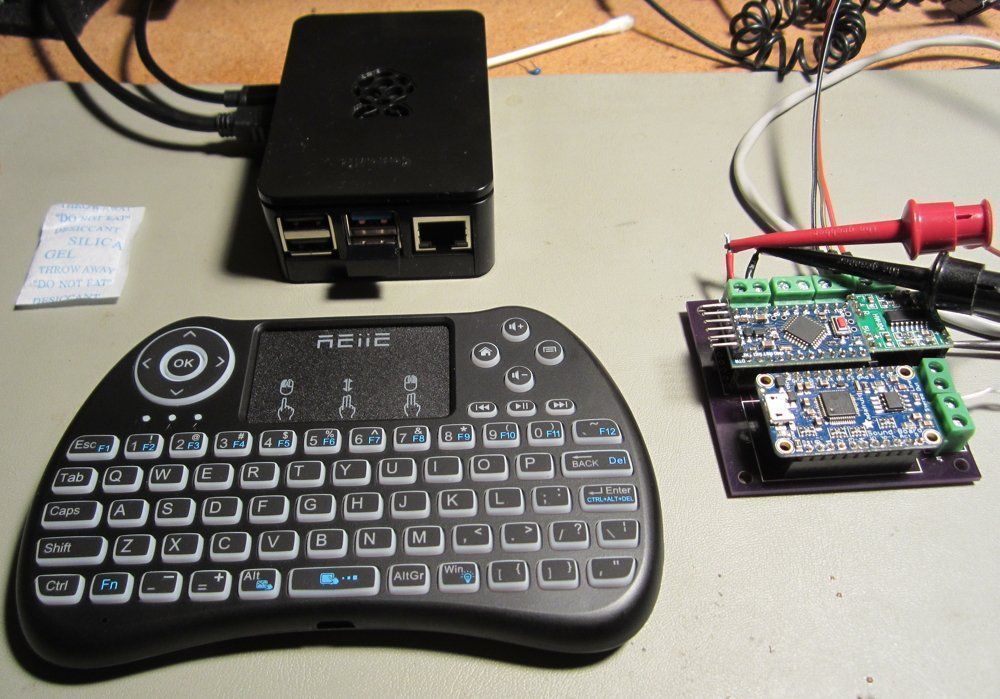
Well, a couple of months ago, I broke down and bought a Raspberry Pi 4 to use in the shack. I bought a “starter kit” that included a power supply, a case (with a fan), heatsinks that attach to the chips on the board, and an SD card. It was all pretty much plug and play.

The only real application that I had in mind for it at the time was to run HamClock, but I figured I’d find some other use for it eventually. Well, eventually was Monday. I replaced the cheap laptop Arduino development with the Raspberry  Pi 4.

This system is great. It’s small—only 2.5-in. wide by 3.5-in. deep— and fits very nicely on my relatively small workbench. It’s much faster than the laptop.

Today, I added the small keyboard shown in the photo. When I took it out of the box, I thought to myself, “Man, this is too small.” It’s only six inches wide, but it works pretty well, and since it has a touchpad, it replaces the mouse as well. I’m not sure that I’d want to do a lot of typing on it, but to make small program changes, it’s fine.

I’m hoping that now that I have a better development system, I’ll actually do more development. We’ll see how that goes.

Filed Under: Computers, Software Tagged With: Arduino, Raspberry Pi

Nice customer service experience

December 20, 2018 By Dan KB6NU 3 Comments

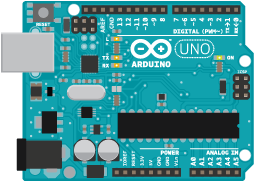
For my recent Arduino class, I bought a couple of inexpensive, Chinese-made, Arduino starter kits off Amazon. They included an Arduino Uno clone, a breadboard board, some components, and some jumper wires.

Overall, they were a pretty good deal for less than $18. Unfortunately, the breadboard was kind of poor quality. One of the students had a real time getting one of the experiements to work, and after quite a bit of troubleshooting, we determined that the jumper wires were just not making good contact with the breadboard.

After the class, I wrote up a review on Amazon:

” Lacks sensors, breadboard quality poorI just bought a couple of these for a class I was teaching. These were very inexpensive, but I was kind disappointed. First of all, the quality of the breadboard seeemed to be very poor. One of the students had problems getting his experiments to work because the components and wires didn’t make good connections. Also, I would have liked to have a temperature sensor and maybe a motor, so we could have done those experiments in class. I’ll be buying a more complete kit next time and maybe trying a different vendor as well.”.

Yesterday, I got the following email from the vendor:

Thank you for taking time to leave your review and letting us know the problem. We are very sorry for the inconvenience this situation has caused you to this point. We’ve already designed a new breadboard which is much better then before. Would you like to have a try?

Please don’t feel unhappy, we will try our best to help you solve all of your problems.Looking forward to your kind reply. Please give us a chance to make things right for you.

Panda

Elegoo Support Team

I am going to give them a chance to make it right. I’ve replied, asking them to send one of their new breadboards. I’ll try it out and let you know.

Filed Under: Classes/Testing/Licensing, Microcontrollers Tagged With: Arduino, Elegoo

My first Arduino class a success

December 2, 2018 By Dan KB6NU 3 Comments

I held my first Arduino class yesterday at All Hands Active (AHA!), a makerspace here in Ann Arbor.I had six students, including a father and his daughter, a high school student, and three other adults.

To teach the class, I used an earlier version of the Sparkfun Inventor’s Kit Guide, even though we didn’t use the Inventor’s Kit in the class. Because the Arduino kits that we did use didn’t have all of the sensors and actuators in the Sparkfun Inventors Kit, we could only do some of the experiments. The experiments that I chose included:

  • Blinking an LED
  • Potentiometer
  • Push Buttons
  • Photo Resistor
  • Buzzer

I would have also liked to do an experiment with a temperature sensor and a motor or servo, but those components weren’t included in the kits that I had. On the other hand, these five experiments took up more than the two hours that I had allotted for the teaching part of the class. So, it worked out OK.

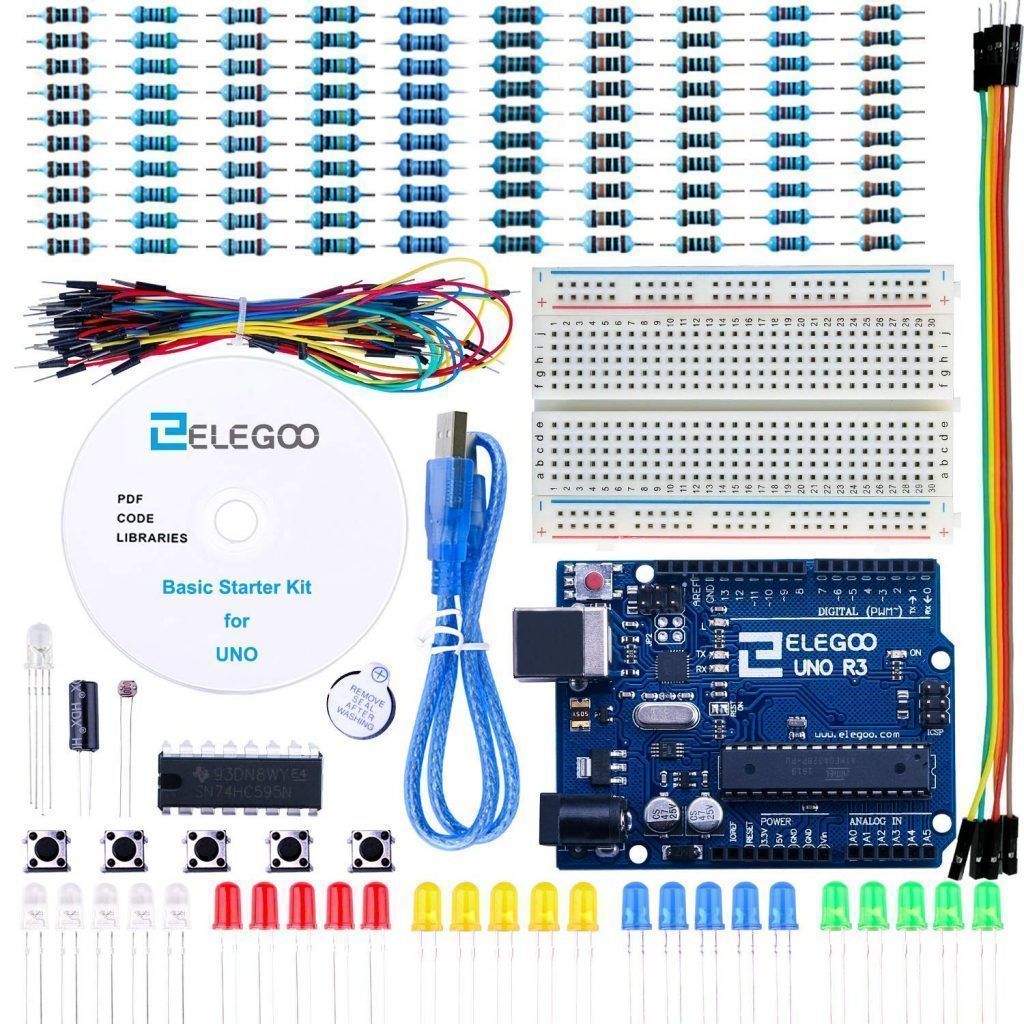
I got the starter kits—the Elegoo EL-KIT-004 UNO Project Basic Starter Kit with Tutorial and UNO R3 for Arduino—from Amazon. My thinking is that it would be inexpensive for students to purchase and had enough “stuff” to get the students started.

Unfortunately, it didn’t really have quite enough “stuff.” It was, for example, missing a potentiometer. So, to supplement the kit, I made up a couple of pots with wires that they could plug into the breadboard. It would also have been nice to have a temperature sensor and a motor or servo, so that the students got a better idea of what you could do with an Arduino.

I also wasn’t thrilled with the quality of the breadboard in the kit. One of the students had a problem getting one of the experiments to work, and as it turned out, it was because one of the wires connecting the components wasn’t making good contact with the breadboard. It just had a cheap feel to it.

I’m thinking that next time I’ll go with something like the Keywish UNO Project Starter Kit for Arduino with UNO R3 Development Board, LCD1602, Breadboard, Servo Motor, Detailed Tutorial. It costs only a few dollars more and includes pots, a servo motor, and even an LCD display. It doesn’t have a temperature sensor, though.

Keeping the students on their toes

Partly to make up for the lack of a temperature sensor and other components, I improvised. The push button experiment called for the students to connect two momentary-contact switches to two digital inputs and an LED to a digital output. To turn on the LED, you pressed and held down one of the switches. Pressing the second, while holding down the first, turned the LED off.

That functionality seemed kind of useless to me, so I challenged the students to modify the program so that pressing one of the switches would turn the LED on and remain on, even if the switch was released. To turn the LED off, you had to press the second switch.

One of the students. Laria, had a solution in minutes. It took the others a little while longer, but after I shared Laria’s solution with them, they all had their versions working soon after. It was a fun exercise and got them thinking “outside the book.”

When all was said and done, I think we all had fun and learned something about Arduinos. The students learned how to do both digital and analog output and  input and got a good sense of what the Arduino can do. I also learned a thing or two about teaching Arduino classes. I plan to have another go at this in three months or so.

Filed Under: Classes/Testing/Licensing, Microcontrollers Tagged With: Arduino

Diodes, Arduino, and VSWR: Articles from popular trade magazines

November 19, 2018 By Dan KB6NU Leave a Comment

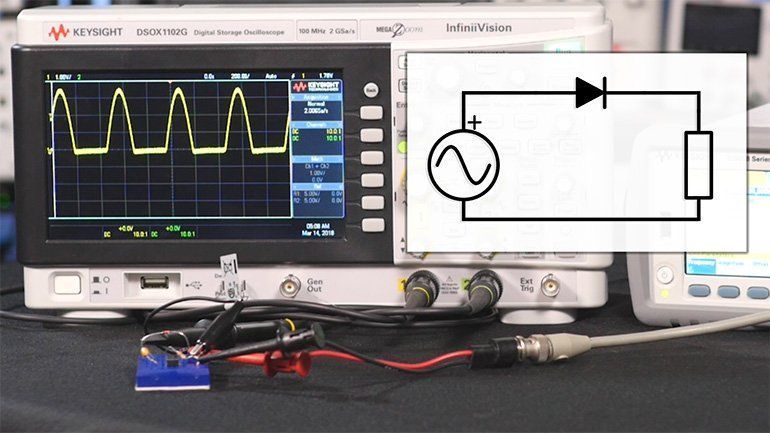
4½ Practical Uses for a Diode

The ubiquitous diode—though you likely have a good understanding of this device, this primer of sorts acts as a quick-read guide, highlighting many of the essentials you need to know.

One of the functions of a diode is to rectify an AC signal.


Rapid Prototyping in the Era of Arduino, mikroBUS, and Processing

The age of rapid prototyping is upon us, with companies such as MikroElektronika, Adafruit, and Arduino making it easier for designers to bring concepts together in an impressively short period of time.


I got this by way of EE Journal:

Measure a Voltage Standing Wave Ratio (VSWR) to Quantify Transmission Line Imperfections

Impedance mismatches in a radio-frequency (RF) electrical transmission line cause power loss and reflected energy. Voltage standing wave ratio (VSWR) is a way to measure transmission line imperfections. This tutorial defines VSWR and explains how it is calculated. Finally, an antenna VSWR monitoring system is shown.

Filed Under: Antennas, Building/Homebrew, Electronics Theory, Microcontrollers Tagged With: Arduino, diodes, SWR

  • Page 1
  • Page 2
  • Go to Next Page »

Primary Sidebar

No Nonsense Technician Class License Study Guide (for tests given between July 2026 and June 2030)

New No Nonsense Technican Class Study Guide now available!

The 2026 version of my Tech Class study guide is now available, and as always, the PDF version is FREE!. The ePub version costs $11.97, and a Kindle version and paperback version will be available on Amazon shortly.

Click here to get all of my "No Nonsense" study guides.

Also available: The CW Geek's Guide to Having Fun with Morse Code

W5SWL.Com
Retevis Ailunce H1 DMR Radio
DXpander: Cobweb antennas, Laser Cutting

You’ve got mail!

Enter your email address below and get an email every time I publish a new post.

Email


I frequently teach classes to help newcomers get their licenses. The next class will take place on Saturday, October 10, 2026 on the University of Michigan campus. Click here for more information.

If you can't make the class, subscribe to the mailing list to be notified of when the next class will be held.

You can always download my free study guide, and if you have any questions about the classes, or amateur radio in general, please feel free to email me directly.

Support KB6NU.Com

Donate $7.30 and get two of these cool stickers. Measuring 4.25-in. W by 2.75-in. H, it's perfect for your car, your shack, or wherever!

Contact me

If you have a question or comment about one of my blog posts, or a question about any of the material in my study guides, or just a question about ham radio in general, you can email me at [email protected].

Blogs You Should Also Read

  • AE5X: A CW-centric blog from Kingswood, Texas
  • K0LWC Blog
  • LA3ZA Ham Radio Blog
  • Little Radios, Big Fun – WB3GCK
  • Mr. Vacuum Tube's Blog
  • Radio Artisan – K3NG
  • The K0NR Weblog
  • VE3WDM's QRP Ham Radio Blog
  • W2LJ’s Blog

Ham Radio Websites

  • Dashtoons – The Hammin' Comedy by Jeff K1NSS

Podcasts

  • ICQ Podcast
  • Linux in the Ham Schack
  • No Nonsense Amateur Radio Podcast
  • Resonant Frequency Amateur Radio Podcast

Recent Comments

  • Bulin 47 AI on ICQPodcast Episode 485 – World Cup Special Event Station
  • Jesse Alexander on What do you think of this artwork for the ham radio EMF Explorer
  • CADProps on My first go at 3D printing not quite a success
  • Dan KB6NU on A Media Guide to Amateur Radio
  • Steve Stroh N8GNJ on A Media Guide to Amateur Radio

Meta

  • Log in
  • Entries feed
  • Comments feed
  • WordPress.org

Footer

Copyright © 2026 Daniel M. Romanchik, KB6NU · Log in