
It’s really amazing what you can do with computers in amateur radio, and there’s been an explosion in the number of digital modes. One interesting mode that I’ve recently been introduced to is WSPR, which is short for Weak Signal Propagation Reporting. The protocol and the original WSPR program was written by Joe Taylor, K1JT, and is designed for sending and receiving low-power transmissions on the HF bands to test propagation paths.
I won’t try to cover all the technical details here. There are several sites that cover them pretty well:
- Wikipedia: WSPR (amateur radio software)
- G4ILO’s Shack: WSPT – Distant Whispers
I was introduced to WSPR by my friend, Joe, AC8ES. He posted a message to our club mailing list asking if anyone had a toroid core that he could buy to make a QRP balun for 10 MHz. When I asked what he was going to use it for, he said that he was making a WSPR transmitter with a Raspberry Pi, and the balun was for the dipole he built for it. He said that he’d gotten roped into doing this because he’d attended a local Raspberry Pi users’ group, and when he mentioned he was an amateur radio operator, they encouraged him to try this project.
How could I refuse a request like that? I have a whole kit of ferrite cores, and after some back and forth, we found a small core that he could use.
The software he chose is the WsprryPi program. It’s described a “Raspberry Pi transmitter using NTP-based frequency calibration.” It uses a GPIO
port to generate WSPR signals anywhere from 0 to 250 MHz. Joe said that there are several Raspberry Pi programs that run WSPR, but that he chose this one because it seemed to have more features than the others.
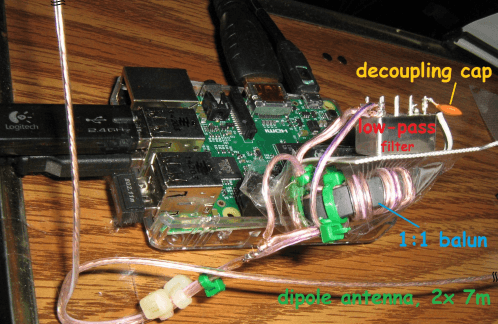
The figure above shows Joe’s setup. Since the output generates a square wave, a low-pass filter is needed to filter out the high-frequency components. As you can see, the GPIO output is fed through a 0.1uF decoupling capacitor into a Mini-Circuits 10.7MHz low-pass filter, then to a 1:1 balun, which is connected directly to the dipole elements.
Joe says, “The antenna is just a dipole taped up to the walls of my living room and hallway.” As you can see he made the balun and dipole from 24 ga speaker wire.
The performance of this setup has been kind of amazing. In one e-mail, Joe reported, “Your toroid seems to be working well. Got the balun and antenna finished and executed seven WSPR transmissions from the Raspberry Pi. The WSPR reporting website (WSPRnet) came back with a couple dozen reception reports; typical distance is ~300+ miles, max was 593 miles.” In a second e-mail, Joe writes, “Did a few more beacon transmissions and checked the WSPR signal reports again. Someone picked up my 5 mW signal from 1010 miles away in Canada.”
Joe’s turned into quite a WSPR fan. He’s even written an Android app – WSPRnet Viewer to retrieve and displays report from www.wsprnet.org. Tapping on a specific report displays more details about it, along with a world map that shows transmitter and receiver locations.
Unfortunately, I don’t have a Raspberry Pi, or I’d try this as well. I do have a BeageBone Black, but there doesn’t seem to be software that I can download and install as easily as the Raspberry Pi software. That being the case, this might be a good excuse to purchase one of those new, cheaper RPis.
Dan – did you see that Julian Moss, G4ILO, according to QRZ, is a silent key as of OCT 2014. He seemed to be a very interesting ham and blogger. He had another blog: http://onefootingrave.blogspot.co.il/, where he wrote about his incurable brain tumor where is death is confirmed. I am grateful that his family has kept his blog on the Internet as it is an amazing resource.
No, I didn’t know that. I’m sorry to hear that.
Dan,
From practical point of view, what’s the advantage of WSPR over something like reverse beacon using JT65?
Sometimes, I leave my station running on JT65 receive, and have it automatically upload to the spotting networks. With JT65, if I see something interesting, I can also jump on and try to work that station (two birds, one stone: I get to see the practical propagation pattern, and work some stations at the same time).
I honestly don’t know. I’ve never used either WSPR or JT65. I just thought this was a cool use of a Raspberry Pi. Perhaps it’s because WSPR spots get logged. Do JT65 spots?
Most of the JT65 software I’ve encountered reports spots to https://pskreporter.info/ at least, and it’s been a pretty good place to see if my propagation in that mode gets out. However, I haven’t done any WSPR yet so I couldn’t say how this compares in terms of amount/distribution of actively receiving stations.
Hi All !
thanks for the good writing.
A great wspr plus : you can follow your spots -and those of others- on a map…from anywhere with a dedicated app on your Phone ( Iphone or android) !
73
Eric
F6FLQ