
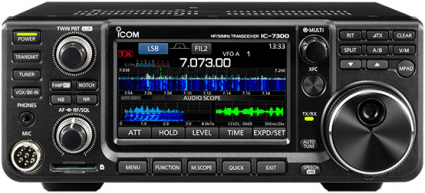
 As I wrote yesterday, the main feature of the new ICOM IC-7300 is the flashy touchscreen display. They’ve done some clever things with the other controls, too. For some functions, the designers use the touchscreen to reduce the number of knobs and buttons on the radio’s front panel.
For example, the IC-746PRO had an RIT/XIT control that you used to set the offset frequency, and a bunch of smaller controls that were used to set the mic gain, CW speed, CW sidetone frequency, and RF output level. They’ve combined all of those functions into a single MULTI control, which is located just outside the upper right-hand corner of the touchscreen.
You press that control, and depending on what mode you’re in, some options pop up on the touch screen. In CW mode, for example, you can select RF output, key speed, and CW sidetone frequency. Tapping selects one of the options, and rotating the knob changes the setting.
This process is all digital, too, meaning that you can more accurately set these parameters. For example, when you set the RF POWER level on the IC-746PRO, you never knew what it was set to, until you actually transmitted, and then, you had to re-adjust, if it wasn’t what you wanted. On the IC-7300, you can set it to 25% or 80% right off the bat. The same goes for CW speed and CW sidetone frequency.
Like I mentioned, the options for the MULTI control change depending on what mode you have the rig set to. If you’re operating SSB, the options are RF POWER, MIC GAIN, COMP (compression, on/off), and MONITOR (on/off). In RTTY mode, the options are RF POWER, TPF (twin peak filter, on/off), and MONITOR (on/off). You also use the MULTI control to set the parameters of the notch filter, noise blanker, noise reducer, VOX, and break-in.
And, in addition to all that, you use the MULTI control to set the RIT and XIT. Setting these increments works exactly the same as on the IC-746PRO.
The designers also made good use of the touch screen for changing bands and direct frequency input. The IC-746PRO had a keypad that provided both of those functions. Each key had both a frequency (1.8, 3.5, 7, etc.) and a number (0,1,2,3,etc.). To change bands, you simply had to touch the right button. For example, to switch to the 40m band, you tapped the 7 (MHz)/3 button.
When you wanted to directly input a frequency, you first touch the F ENT button and then typed in the frequency. I had that radio for more than 12 years, but I still got confused by that. I would often want to enter a frequency of 7.030.00, and more often than not, I’d hit the 7 MHz/3 button without thinking and then have to do it all over again.
I can’t make that mistake on the IC-7300. To change bands or directly input a frequency, you first touch the MHz portion of the frequency display. When you do that, a keyboard pops up on the screen with keys labelled with the frequency bands. You can then touch one of the buttons to change bands, or if you want to directly enter a frequency, you touch the F ENT button on the screen. When you do this the buttons change to a numerical keypad and you enter the frequency directly. This works great!
Another user-interface features worth mentioning is that the headphone jack is a 1/8-in. jack, not a 1/4-in. jack. I happen to like that because I’m using an old computer headset with a 1/8-in. plug. If you have a set of headphones with a 1/4-in. plug, you’re going to have to get an adapter.
On a lot of rigs, the lack of knobs and buttons makes the radio more difficult to use because you have to wade through a lot of menus to get to the functions you want. While this is somewhat true of the IC-7300 when compared to the IC-746PRO, it doesn’t really seem to be that much more difficult. I think the designers really put a lot of thought into how to make the functions as accessible as possible while cutting down on the number of knobs and buttons.
Hello Dan. My friend, G0EHQ has an IC-7300 and he has shown me around it. As a blind person, I can’t operate it too well because you can only perform many functions using the touch screen.
Strangely enough, when I first encountered the IC-7300 at Field Day, it frustrated me because all the touch screen stuff is not intuitive, until you understand that almost everything on the screen is responsive. I kept looking for knobs to do things, until I finally realized that a number of function where given over to exclusively touch functions.
Until you touch the frequency, though, for instance, there is nothing to clue you into the idea that touching it will get you an on screen menu to change bands.
This is the curse of graphical interfaces. If you don’t know the shortcuts, you miss out on a lot of functionality.
Who knows, for instance that if you shake a window on a Windows 7 or later system, if will minimize all the other windows on the display? Shake it again, and all those windows will re-open. Grab the top edge of the window and stretch it to the top of the display, and it will auto-size to fill the screen from top to bottom. Grab the window and move the mouse to the right side of the screen, and it will auto-size the window to fill exactly the right-half of the screen. Grab another window and move it to the left edge of the screen, and it will auto-size to fill the left-hand of the screen. You now have set up two windows for side-by-side comparison and editing with no overlap.
How many folks know all this (and there are other cool hidden ‘stupid mouse tricks’)? You can only find this out if someone show them to you, or you Read The Fine Manual (RTFM).
Dan, as an early adopter of the Icom 7300, I couldn’t agree more with you commentary.
When I have been pressed for my thoughts on a great entry level rig, for new hams that are not restricted by budget, the Icom 7300 is a clear winner.
One amateur new to the hobby commented after using the rig that “he is glad he bought a radio he can grow into”.
I am looking forward to having a 7610 in the shack, there is a particularly suspicious package under the tree!
Brian, VA7BDG, and totally blind. I have a Kenwood TS590SG with a VGS1 voice module. The rig is completely accessible, and I rather prefer the knobs and push-buttons. As I understand, the 7300 has a built-in voice-over system, however I haven’t been able to find out if blind hams working with sighted hams have played with a 7300 to see if it is as accessible as the TS590?
I’ve had the IC-7300 for about three days now. and no, it has no voiceover type system, save that of the UT-102 Speech card that came with the likes of the 7000 etc. Using RSBA-1 V2, or Win4IcomSuite is the only real way one can access most of the radio controls, save those that have hard buttons. now, having said that, to change menu settings like tone etc, you need programming software. so being able to change those things on the fly is out of the accessible question.
As a blind ham myself, I reached out to Icom to see if they’re going to make any of their gear as accessible as we white sticks need it to be. I’ve had some responses, but, I don’t think we’re going to see anything for the foreseeable future.
73.
Shaun
VK5ESE